
Summary
Exposes NVEIL's two-stage visualization workflow to Claude: you describe what you want in natural language, the server sends only column names and summary stats to NVEIL's API to generate a processing spec, then renders the chart locally with your raw data never leaving the machine. The MCP server surfaces describe (schema and preview), generate_spec (returns a reusable .nveil file), and render (executes the spec offline) as tools. Handles 50+ chart types across Plotly, VTK, and DeckGL backends, including geospatial heatmaps, 3D volumes, and scientific visualizations. Reach for this when you need publication-ready charts from conversational prompts but can't send your actual dataset to a remote service. Requires a NVEIL API key from app.nveil.com.


Keep your Mac awake while Claude Code and 40+ AI agents run. Sleeps when they're idle.
One time payment $9 →

Integrate web data into your AI product. One API to scrape website & brand data.
Get API Key Now →
Agent, run crypto. Access onchain data & trade routes via 1inch.
Install now →
On Capafy, your Skill runs online 24/7 as an agent product, and you get paid every time someone uses it.
Start earning →

NVEIL Toolkit
Describe your data. Get production charts. Your data stays local.




Quickstart • API Reference • Examples • Changelog
NVEIL is an AI-powered data visualization toolkit. Write one line of natural language, and NVEIL processes your data and generates publication-ready visualizations — no chart code, no hallucinations, no data leaving your machine.
import nveil

nveil.configure(api_key="nveil_...")

# Pass a file path directly — no DataFrame loading required.
spec = nveil.generate_spec("Revenue by region, colored by quarter", "sales.csv")

fig = spec.render("sales.csv")   # 100% local — no API call
nveil.show(fig)                   # opens in browser
From your shell
After pip install nveil the nveil command is on your $PATH:
export NVEIL_API_KEY=nveil_...

# Ground yourself on the dataset (shape / dtypes / head preview)
nveil describe sales.csv

# Generate HTML + PNG + a reusable .nveil spec, print the explanation
nveil generate "Revenue by region, colored by quarter" \
  --data sales.csv --format all --explain

# Re-render an existing spec on fresh data — no API call
nveil render chart.nveil --data new_sales.csv
For AI agents (Claude Code / Claude Desktop / Cursor / Codex / …)
NVEIL ships first-class integrations:
# Claude Code / Claude Desktop — install the bundled skill
nveil install-skill

# Claude Desktop, Cursor, any MCP client — add an MCP server:
# {"mcpServers": {"nveil": {"command": "nveil", "args": ["mcp"]}}}
nveil mcp                    # stdio server; launched by the MCP client
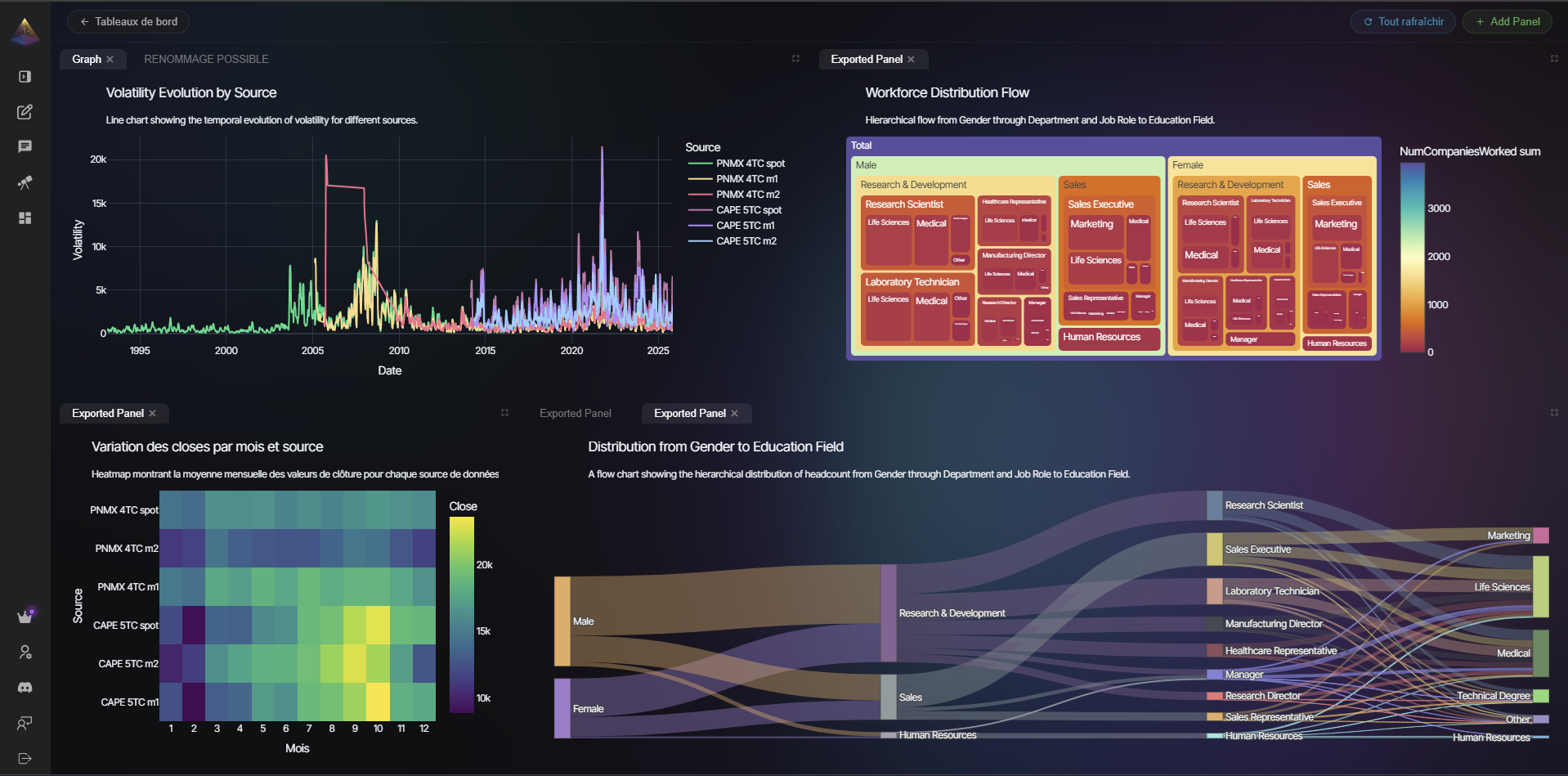
Why NVEIL?
| Capability | NVEIL | Chatbot data analysis¹ | LLM-to-viz libraries² | Traditional plotting³ |
|---|---|---|---|---|
| Natural-language input | ✓ | ✓ | ✓ | ✗ |
| Raw data stays on your machine | ✓ | ✗ | ✗ | ✓ |
| Only schema + stats sent to server | ✓ | ✗ | ✗ | N/A |
| Deterministic, reproducible output | ✓ | ✗ | ✗ | ✓ |
| Offline re-rendering, zero API calls | ✓ | ✗ | ✗ | ✓ |
Portable saved specs (.nveil files) | ✓ | ✗ | ✗ | ✗ |
| 2D + 3D + geospatial + scientific | ✓ | 2D | 2D | varies |
| Multi-backend (Plotly, VTK, DeckGL) | ✓ | ✗ | ✗ | ✗ |
| Data processing engine | ✓ | ✓ | partial | ✗ |
¹ ChatGPT Advanced Data Analysis, Claude Analysis tool, Gemini Data Agent · ² PandasAI, LIDA, Julius, Vanna · ³ Plotly, Matplotlib, Seaborn
How It Works
Your Data ──> Toolkit ──metadata only──> NVEIL AI ──> Processing Plan ──> Local Execution ──> Result
               ^                                                           ^
          raw data stays here                                     raw data stays here
- You describe what you want in plain language
- NVEIL AI plans the data processing and visualization (only metadata is sent — column names, types, statistics)
- The Toolkit executes locally — joins, aggregations, pivots, rendering — all on your machine
- You get a figure — Plotly, VTK, or DeckGL, auto-selected for your data
Key Features
🧠 Two Engines in OneData processing (joins, pivots, aggregations, geocoding, time series) AND visualization generation from a single prompt. 🔒 Data Privacy by DesignRaw data never leaves your machine. Only column names, types, and aggregate statistics are sent. 📈 Multi-Backend RenderingAuto-detects the best engine: Plotly (2D charts), VTK (3D/medical), DeckGL (geospatial). |
🧪 Auditable ResultsPowered by constraint solving, not random generation. Same input = same output, every time. ⚡ Offline Rendering
💾 Reusable SpecsSave to |
Beyond Simple Charts
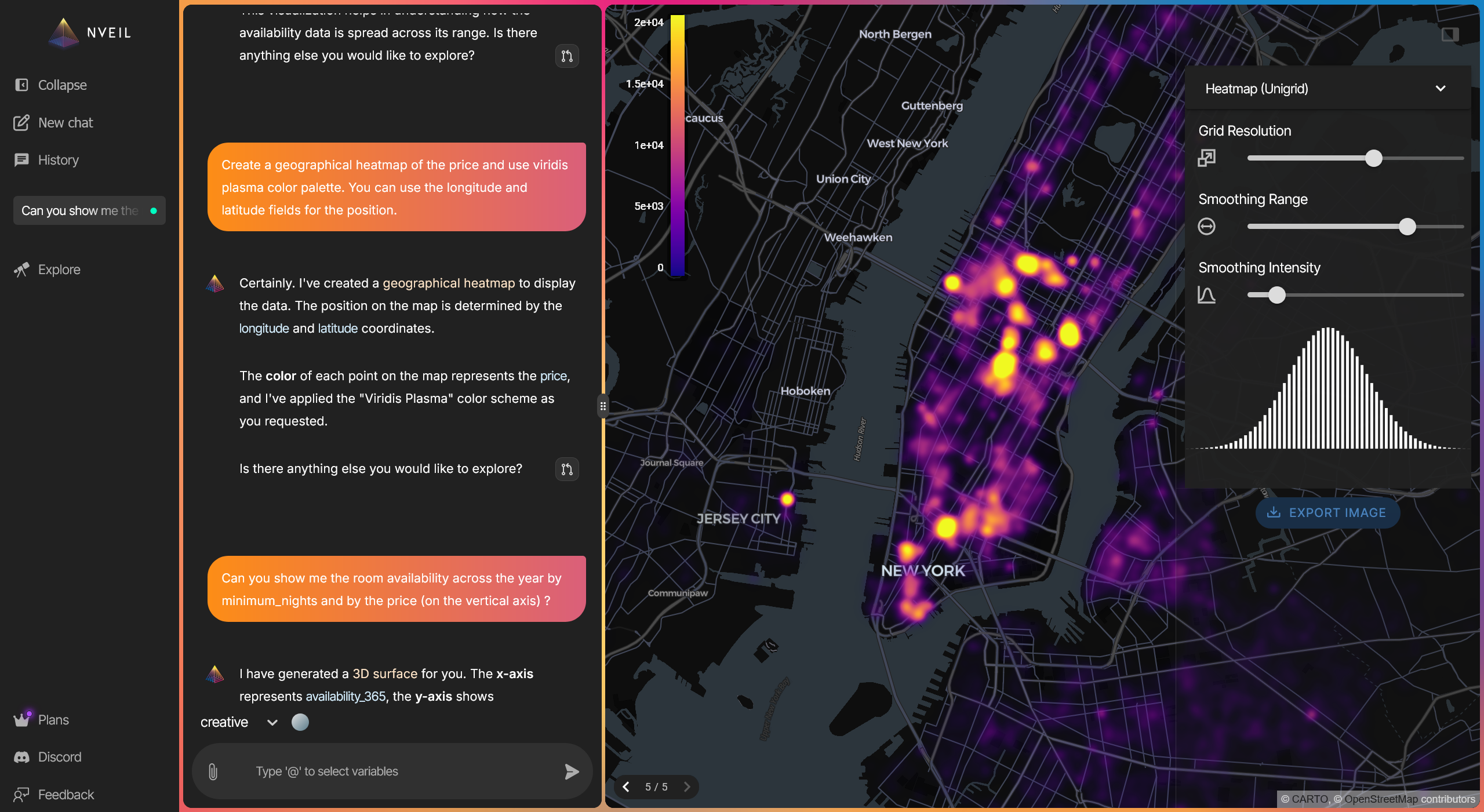
NVEIL handles geospatial heatmaps, 3D volumes, scientific visualizations, medical imaging (DICOM), biosignal data (EDF/EDF+), network graphs, and 50+ other visualization types — all from natural language.
Save Once, Render Forever
# Generate once (API call)
spec = nveil.generate_spec("Monthly trend by category", df)
spec.save("trend.nveil")

# Reload anywhere — no API call, no server, no cost
spec = nveil.load_spec("trend.nveil")
fig = spec.render(fresh_data)
nveil.save_image(fig, "report.png")
Installation
pip install nveil
Requirements: Python 3.10+
Getting Started
- Create an account at app.nveil.com
- Generate an API key in Settings
- Start visualizing
import os
import nveil

nveil.configure(api_key=os.environ["NVEIL_API_KEY"])

spec = nveil.generate_spec("scatter plot of price vs area", df)
fig = spec.render(df)
nveil.show(fig)
See the examples/ directory for more usage patterns.
Documentation
Full documentation is available at docs.nveil.com:
- Quickstart Guide
- Core Concepts — sessions, specs, and the two-stage flow
- API Reference — full reference for all public functions
- Privacy Model — what data is sent, what stays local
- Examples — bar charts, multi-dataset, offline rendering
Contributing
Contributions are welcome under the project's Contributor License Agreement. Bug reports and feature requests are welcome via GitHub Issues.
License
GNU AGPL v3 or later. See LICENSE. Commercial dual-licensing is available — contact pierre.jacquet@nveil.com.
Featured
Keep your Mac awake while Claude Code and 40+ AI agents run. Sleeps when they're idle.
One time payment $9 →Integrate web data into your AI product. One API to scrape website & brand data.
Get API Key Now →Agent, run crypto. Access onchain data & trade routes via 1inch.
Install now →On Capafy, your Skill runs online 24/7 as an agent product, and you get paid every time someone uses it.
Start earning →Configuration
NVEIL_API_KEY*secretNVEIL planning service API key. Obtain at https://nveil.com.
Categories
Registryactive
Packagenveil
TransportSTDIO
AuthRequired
UpdatedApr 23, 2026


