
Summary
This connects Claude to your local kubefwd instance via its REST API, letting you manage Kubernetes port forwards conversationally. You can start and stop service forwards, check connection status, view traffic metrics, and stream pod logs without leaving your editor. It's for when you're already running kubefwd in TUI or API mode and want to adjust which services you're forwarding or debug connection issues through natural language instead of switching windows. The integration assumes you have kubefwd running with the API flag enabled and proper kubeconfig access to your target cluster.


Keep your Mac awake while Claude Code and 40+ AI agents run. Sleeps when they're idle.
One time payment $9 →

Integrate web data into your AI product. One API to scrape website & brand data.
Get API Key Now →
Agent, run crypto. Access onchain data & trade routes via 1inch.
Install now →
On Capafy, your Skill runs online 24/7 as an agent product, and you get paid every time someone uses it.
Start earning →
kubefwd (Kube Forward)







Documentation | Getting Started | User Guide | API Reference | MCP (AI Integration)
Develop Locally, Connect to Kubernetes
kubefwd enables developers to work on their local machine while seamlessly accessing services running in a Kubernetes cluster. If you're building a new API that needs to connect to a database at db:5432, an auth service at auth:443, and a cache at redis:6379, all running in your development cluster, kubefwd makes them available locally by their service names, exactly as they would appear in-cluster. No environment-specific configuration, no local service setup, no Docker Compose files. Just run kubefwd and your application's existing connection strings work.
This is the essential use case: reduce or eliminate environment-specific connection setup and configurations during local development. Your code uses http://api-gateway:8080 in production? It works the same way on your laptop with kubefwd.
Bulk Kubernetes port forwarding with an interactive TUI, unique IPs per service, and automatic reconnection.
kubefwd is a command-line utility that bulk port forwards Kubernetes services to your local workstation. Each service gets its own unique loopback IP (127.x.x.x), eliminating port conflicts and enabling realistic local development with cluster services accessible by name.

Quick Start
# Install (macOS)
brew install kubefwd

# Forward all services in a namespace with the interactive TUI
sudo -E kubefwd svc -n my-namespace --tui
Press ? for help, q to quit. See Getting Started for detailed installation and setup.
How It Works
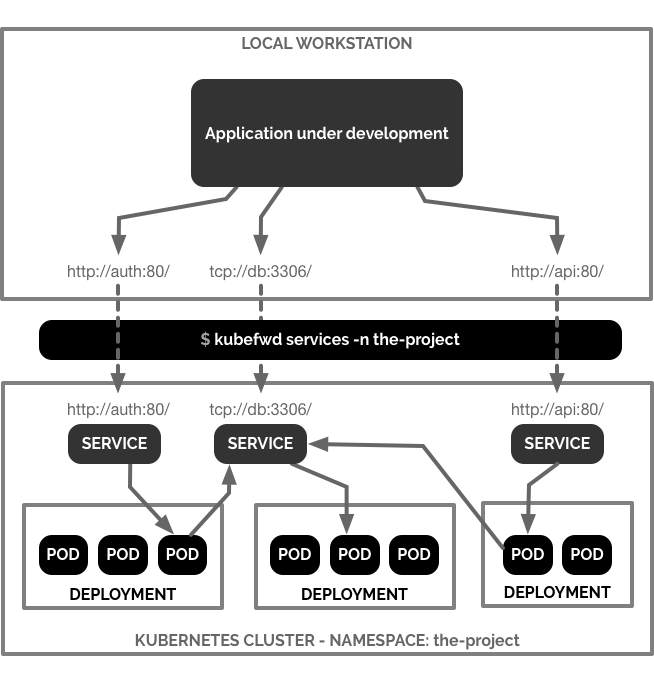
kubefwd discovers services in your namespace, assigns each a unique loopback IP, updates /etc/hosts with service names, and establishes port forwards through the Kubernetes API. Access services by name just like in-cluster:
curl http://api-service:8080
mysql -h database -P 3306
redis-cli -h cache -p 6379
Features
- Interactive TUI: Real-time service monitoring with traffic metrics
- Unique IP per Service: Each service gets its own 127.x.x.x address
- Auto-Reconnect: Reconnects when pods restart or connections drop
- Bulk Forwarding: Forward all services in a namespace with one command
- Live Traffic Monitoring: See bytes in/out and HTTP activity
- Pod Log Streaming: View container logs in the TUI
- REST API: Programmatic control via HTTP endpoints
- MCP Support: Integration with AI assistants (Claude Code, Cursor)
Installation
macOS:
brew install kubefwd
Linux: Download .deb, .rpm, or .tar.gz from releases
Windows:
winget install txn2.kubefwd
# or
scoop install kubefwd
Docker:
docker run -it --rm --privileged \
  -v "$HOME/.kube:/root/.kube:ro" \
  txn2/kubefwd services -n my-namespace --tui
Usage
# Interactive mode (recommended)
sudo -E kubefwd svc -n default --tui

# Multiple namespaces
sudo -E kubefwd svc -n default,staging --tui

# Filter by label
sudo -E kubefwd svc -n default -l app=api --tui

# With REST API enabled
sudo -E kubefwd svc -n default --tui --api
Why kubefwd?
Unlike kubectl port-forward, kubefwd:
| Feature | kubectl port-forward | kubefwd |
|---|---|---|
| Services per command | One | All in namespace |
| IP allocation | localhost only | Unique IP per service |
| Port conflicts | Manual management | None (unique IPs) |
| Service name resolution | Not supported | Automatic (/etc/hosts) |
| Auto-reconnect | No | Yes |
| Real-time monitoring | No | TUI with metrics |
See Comparison for detailed comparisons with Telepresence, mirrord, and other tools.
Documentation
Full documentation at kubefwd.com:
- Getting Started - Installation and setup
- User Guide - Interface and shortcuts
- Configuration - CLI options
- Advanced Usage - Multi-cluster, selectors
- REST API - API reference
- MCP Integration - AI assistant setup
- Troubleshooting - Common issues
- Architecture - Technical details
- Comparison - vs Telepresence, mirrord
Requirements
- kubectl configured with cluster access
- Root/sudo access (for /etc/hosts and network interfaces)
Contributing
We welcome contributions for bug fixes, tests, and documentation. Feature development is limited to maintainers. See CONTRIBUTING.md.
License
Open source by Craig Johnston, sponsored by Deasil Works, Inc.
Featured
Keep your Mac awake while Claude Code and 40+ AI agents run. Sleeps when they're idle.
One time payment $9 →Integrate web data into your AI product. One API to scrape website & brand data.
Get API Key Now →Agent, run crypto. Access onchain data & trade routes via 1inch.
Install now →On Capafy, your Skill runs online 24/7 as an agent product, and you get paid every time someone uses it.
Start earning →Categories
Registryactive
Packagehttps://github.com/txn2/kubefwd/releases/download/v1.25.15/kubefwd-1.25.15-darwin-arm64.mcpb
TransportSTDIO
UpdatedMay 29, 2026


