
Summary
Turns Claude Desktop into a capture layer for Obsidian without leaving the chat window. Wraps the official Obsidian CLI (the one that ships with the app) as MCP tools so you can save conversations to your vault, search your notes, query backlinks, and create new entries from Templater templates. The generic pass-through tool exposes all 80+ CLI commands, while typed helpers handle daily notes, tasks, frontmatter properties, and full-text search. Requires Obsidian running with its command line interface enabled in settings. Useful when your research happens in chat but your permanent notes live in a vault and you want to wire them together without context switching or clipboard gymnastics.


Keep your Mac awake while Claude Code and 40+ AI agents run. Sleeps when they're idle.
One time payment $9 →

Integrate web data into your AI product. One API to scrape website & brand data.
Get API Key Now →
Agent, run crypto. Access onchain data & trade routes via 1inch.
Install now →
On Capafy, your Skill runs online 24/7 as an agent product, and you get paid every time someone uses it.
Start earning →
mcp-obsidian-cli





Your thinking starts in Claude Desktop, not in Obsidian. You research, draft, argue with the model, and when something's worth keeping you say "save this to my vault." It lands in the right place: your template, your properties, today's daily note, wired into your link graph. No tab-switch, no copy-paste.
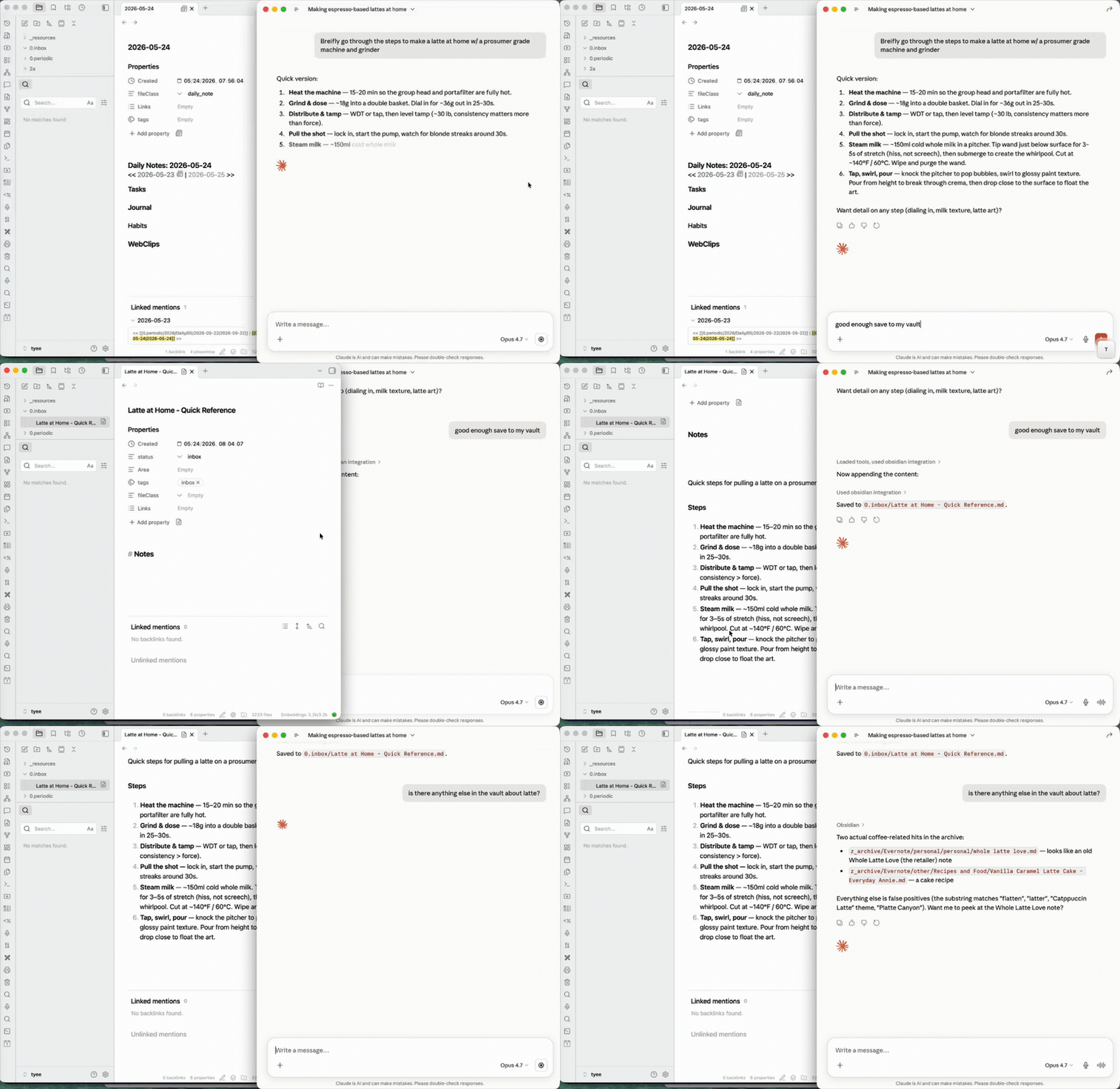
Two halves:
- Capture — turn a conversation into a real note, filed where it belongs.
- Augment — pull what's already in the vault (backlinks, full-text search) back into the chat to inform or update a note.
Needs Obsidian running. It can sit minimized, so you never switch to it.
On Claude Code? The native obsidian-cli skill fits better there: direct CLI, no MCP layer. Use that.
Quick start
New here? The Install brief has a one-line prompt you paste into Claude Code — it then does the whole setup (checks Node, enables the Obsidian CLI, edits your Claude Desktop config, verifies it works).
npx mcp-obsidian-cli
Claude Desktop config
Add to ~/Library/Application Support/Claude/claude_desktop_config.json:
{
  "mcpServers": {
    "obsidian": {
      "command": "npx",
      "args": ["-y", "mcp-obsidian-cli"],
      "env": {
        "OBSIDIAN_VAULT": "my-vault"
      }
    }
  }
}
Requirements
- Obsidian running with its command line interface enabled (Settings → General → Advanced → Command line interface). The CLI ships built into Obsidian — nothing extra to install.
obsidian-clireachable — on your PATH, or pointOBSIDIAN_CLI_PATHat it (typically/Applications/Obsidian.app/Contents/MacOS/obsidian-clion macOS).- Node.js >= 18
Full walkthrough: docs/INSTALL.md.
How it works
The server exposes Obsidian CLI commands as MCP tools. A generic pass-through tool handles the full CLI surface (80+ commands), plus typed convenience tools for common operations:
| Tool | Description |
|---|---|
obsidian | Generic pass-through — run any CLI command (ships intent→verb cheatsheet, pre-call manifest validation, reload detection) |
obsidian_help | Manifest-backed help — list verbs by category, or look up a single verb / doc topic |
obsidian_daily_read | Read today's daily note |
obsidian_daily_append | Append to daily note |
obsidian_read | Read a note by name or path |
obsidian_search | Full-text search with context |
obsidian_tags | List tags with counts |
obsidian_tasks | Query tasks (daily, todo, done) |
obsidian_properties | Read frontmatter properties |
obsidian_create | Create a new plain note (no Templater expansion) |
obsidian_create_from_template | Create a note from a Templater template (expands <% ... %> placeholders) |
obsidian_property_set | Set a frontmatter property |
obsidian_backlinks | List backlinks to a note |
obsidian_files | List vault files |
obsidian_recents | Recently opened files |
The generic obsidian tool means the MCP server never falls behind the CLI — new CLI commands work immediately without a server update.
Environment variables
| Variable | Default | Description |
|---|---|---|
OBSIDIAN_VAULT | (none) | Target vault by name |
OBSIDIAN_CLI_PATH | obsidian-cli | Path to CLI binary |
OBSIDIAN_TIMEOUT_MS | 15000 | Command timeout |
XDG_CONFIG_HOME | ~/.config | Base path for config file |
Config file
The server can read settings from a YAML config file:
- Default:
~/.config/mcp-obsidian-cli/config.yaml - With
XDG_CONFIG_HOME:$XDG_CONFIG_HOME/mcp-obsidian-cli/config.yaml
Config file format:
vault: "my-vault"
cliPath: "obsidian-cli"
timeoutMs: 15000
Config precedence: env vars > config file > hardcoded defaults
What it can do
It talks to the running Obsidian instance, so it works with your vault the way Obsidian sees it:
- Backlinks and full-text search across your resolved link graph and search index (the augment half).
- Templater templates and typed frontmatter properties when creating or updating notes.
- Daily notes, task queries, and tag counts.
- 80+ commands through the generic pass-through. No API keys, no REST plugin. Just the official Obsidian CLI.
Bugs / requests
File an issue: https://github.com/stonematt/mcp-obsidian-cli/issues/new/choose. Bug template asks for version, MCP client, tool call, and response — quick to fill, fast to act on.
License
MIT

Maintained by @stonematt Licensed under the MIT License
Trademark Notice: "Obsidian" is a trademark of Obsidian Publishing, Inc. This project is not affiliated with or endorsed by Obsidian Publishing.
Featured
Keep your Mac awake while Claude Code and 40+ AI agents run. Sleeps when they're idle.
One time payment $9 →Integrate web data into your AI product. One API to scrape website & brand data.
Get API Key Now →Agent, run crypto. Access onchain data & trade routes via 1inch.
Install now →On Capafy, your Skill runs online 24/7 as an agent product, and you get paid every time someone uses it.
Start earning →Configuration
OBSIDIAN_VAULTTarget vault name. If unset or unknown, the server prompts the caller on first tool use, listing the vaults Obsidian knows about.
OBSIDIAN_CLI_PATHdefault: obsidian-cliPath to the obsidian-cli binary. Auto-discovered on macOS; set explicitly on Linux/Windows or if the binary is non-standard.
OBSIDIAN_TIMEOUT_MSdefault: 15000Per-command timeout in milliseconds.
Registryactive
Packagemcp-obsidian-cli
TransportSTDIO
UpdatedMay 24, 2026


