
Summary
Bridges Claude, GPT, and other LLMs to ROS and ROS2 robots through rosbridge, letting you publish and subscribe to topics, call services and actions, set parameters, and read sensor data without modifying your robot code. The LLM can discover available topics and services at runtime, including custom message types, so it learns the right syntax on the fly. Works across ROS distributions from ROS1 through ROS2 Jazzy and Humble. Particularly useful for natural language robot control, debugging industrial systems by querying state through custom services, or giving LLMs full observability into what your robot is doing. Built on stdio transport and works with any MCP client.
Install to Claude Code
verifiedclaude mcp add ros -- uvx ros-mcpRun in your terminal. Replace YOUR_* placeholders with real values; add --scope user to install for every project.
Review the command, arguments, and environment values before installing — MCP servers run with your local permissions.


Keep your Mac awake while Claude Code and 40+ AI agents run. Sleeps when they're idle.
One time payment $9 →

Integrate web data into your AI product. One API to scrape website & brand data.
Get API Key Now →
Agent, run crypto. Access onchain data & trade routes via 1inch.
Install now →
On Capafy, your Skill runs online 24/7 as an agent product, and you get paid every time someone uses it.
Start earning →
Tools
Verified live against the running server on Jun 11, 2026.
verified live31 tools
get_actionsGet list of all available ROS actions. Works only with ROS 2. Example: get_actions()
Get list of all available ROS actions. Works only with ROS 2. Example: get_actions()
No parameters — call it with no arguments.
get_action_detailsGet complete action details including type, goal, result, and feedback structures. Works only with ROS 2. Example: get_action_details('/turtle1/rotate_absolute')1 params
Get complete action details including type, goal, result, and feedback structures. Works only with ROS 2. Example: get_action_details('/turtle1/rotate_absolute')
Parameters* required
action*stringThe action name (e.g., '/turtle1/rotate_absolute')
get_action_statusGet action status for a specific action name. Works only with ROS 2. Example: get_action_status('/fibonacci')1 params
Get action status for a specific action name. Works only with ROS 2. Example: get_action_status('/fibonacci')
Parameters* required
action_name*stringThe action name (e.g., '/fibonacci')
send_action_goalSend a goal to a ROS action server. Works only with ROS 2. Example: send_action_goal('/turtle1/rotate_absolute', 'turtlesim/action/RotateAbsolute', {'theta': 1.57})4 params
Send a goal to a ROS action server. Works only with ROS 2. Example: send_action_goal('/turtle1/rotate_absolute', 'turtlesim/action/RotateAbsolute', {'theta': 1.57})
Parameters* required
goal*objectThe goal message to send
timeoutnumberTimeout for action completion in seconds. If None, uses ws_manager.default_timeout.
action_name*stringThe name of the action to call (e.g., '/turtle1/rotate_absolute')
action_type*stringThe type of the action (e.g., 'turtlesim/action/RotateAbsolute')
cancel_action_goalCancel a specific action goal. Works only with ROS 2. Example: cancel_action_goal('/turtle1/rotate_absolute', 'goal_1758653551839_21acd486')2 params
Cancel a specific action goal. Works only with ROS 2. Example: cancel_action_goal('/turtle1/rotate_absolute', 'goal_1758653551839_21acd486')
Parameters* required
goal_id*stringThe goal ID to cancel
action_name*stringThe name of the action (e.g., '/turtle1/rotate_absolute')
connect_to_robotConnect to the robot by setting the IP/port. This tool also tests connectivity to confirm that the robot is reachable and the port is open.4 params
Connect to the robot by setting the IP/port. This tool also tests connectivity to confirm that the robot is reachable and the port is open.
Parameters* required
ipstringThe IP address of the rosbridge server.default: 127.0.0.1
portvalueThe port number of the rosbridge server.default: 9090
ping_timeoutnumberTimeout for ping in seconds. Default = 2.0.default: 2
port_timeoutnumberTimeout for port check in seconds. Default = 2.0.default: 2
ping_robotPing a robot's IP address and check if a specific port is open. A successful ping to the IP but not the port can indicate that ROSbridge is not running. Example: ping_robot(ip='192.168.1.100', port=9090)4 params
Ping a robot's IP address and check if a specific port is open. A successful ping to the IP but not the port can indicate that ROSbridge is not running. Example: ping_robot(ip='192.168.1.100', port=9090)
Parameters* required
ip*stringThe IP address to ping (e.g., '192.168.1.100')
port*integerThe port number to check (e.g., 9090)
ping_timeoutnumberTimeout for ping in seconds. Default = 2.0.default: 2
port_timeoutnumberTimeout for port check in seconds. Default = 2.0.default: 2
get_verified_robot_specLoad specifications and usage context for a verified robot model. ONLY use if the robot model is in the verified list (use get_verified_robots_list first to check). Most robots won't have a spec - that's OK, connect directly using connect_to_robot instead.1 params
Load specifications and usage context for a verified robot model. ONLY use if the robot model is in the verified list (use get_verified_robots_list first to check). Most robots won't have a spec - that's OK, connect directly using connect_to_robot instead.
Parameters* required
name*stringThe exact robot model name from the verified list.
get_verified_robots_listList pre-verified robot models that have specification files with usage guidance available. Use this to check if a robot model has additional context available before calling get_verified_robot_spec. If your robot is not in this list, you can still connect to it directly using...
List pre-verified robot models that have specification files with usage guidance available. Use this to check if a robot model has additional context available before calling get_verified_robot_spec. If your robot is not in this list, you can still connect to it directly using...
No parameters — call it with no arguments.
detect_ros_versionDetect the ROS version and distribution via rosbridge.
Detect the ROS version and distribution via rosbridge.
No parameters — call it with no arguments.
analyze_previously_received_imageAnalyze a previously received image that was saved by any ROS operation. Images can be received from: - Any topic containing image data (not just topics with 'Image' in the name) - Service responses containing image data - subscribe_once() or subscribe_for_duration() operation...1 params
Analyze a previously received image that was saved by any ROS operation. Images can be received from: - Any topic containing image data (not just topics with 'Image' in the name) - Service responses containing image data - subscribe_once() or subscribe_for_duration() operation...
Parameters* required
image_pathstringPath to the saved image file (default: "./camera/received_image.jpeg")default: ./camera/received_image.jpeg
get_nodesGet list of all currently running ROS nodes. Example: get_nodes()
Get list of all currently running ROS nodes. Example: get_nodes()
No parameters — call it with no arguments.
get_node_detailsGet detailed information about a specific node including its publishers, subscribers, and services. Example: get_node_details('/turtlesim')1 params
Get detailed information about a specific node including its publishers, subscribers, and services. Example: get_node_details('/turtlesim')
Parameters* required
node*stringThe node name (e.g., '/turtlesim')
get_parameterGet a single ROS parameter value by name. Works only with ROS 2. Example: get_parameter('/turtlesim:background_b')1 params
Get a single ROS parameter value by name. Works only with ROS 2. Example: get_parameter('/turtlesim:background_b')
Parameters* required
name*stringThe parameter name (e.g., '/turtlesim:background_b')
set_parameterSet a single ROS parameter value. Works only with ROS 2. Example: set_parameter('/turtlesim:background_b', '255')2 params
Set a single ROS parameter value. Works only with ROS 2. Example: set_parameter('/turtlesim:background_b', '255')
Parameters* required
name*stringThe parameter name (e.g., '/turtlesim:background_b')
value*stringThe parameter value to set
has_parameterCheck if a ROS parameter exists. Works only with ROS 2. Example: has_parameter('/turtlesim:background_b')1 params
Check if a ROS parameter exists. Works only with ROS 2. Example: has_parameter('/turtlesim:background_b')
Parameters* required
name*stringThe parameter name (e.g., '/turtlesim:background_b')
delete_parameterDelete a ROS parameter. Works only with ROS 2. Example: delete_parameter('/turtlesim:background_b')1 params
Delete a ROS parameter. Works only with ROS 2. Example: delete_parameter('/turtlesim:background_b')
Parameters* required
name*stringThe parameter name (e.g., '/turtlesim:background_b')
get_parametersGet list of all ROS parameter names for a specific node. Works only with ROS 2. Example: get_parameters('cam2image') get_parameters('/cam2image')1 params
Get list of all ROS parameter names for a specific node. Works only with ROS 2. Example: get_parameters('cam2image') get_parameters('/cam2image')
Parameters* required
node_name*stringThe node name (e.g., '/turtlesim')
get_parameter_detailsGet comprehensive details about a specific ROS parameter including value, type, and metadata. Works only with ROS 2. Example: get_parameter_details('/turtlesim:background_r')1 params
Get comprehensive details about a specific ROS parameter including value, type, and metadata. Works only with ROS 2. Example: get_parameter_details('/turtlesim:background_r')
Parameters* required
name*stringThe parameter name (e.g., '/turtlesim:background_r')
get_servicesGet list of all available ROS services. Example: get_services()
Get list of all available ROS services. Example: get_services()
No parameters — call it with no arguments.
get_service_typeGet the service type for a specific service. Example: get_service_type('/rosapi/topics')1 params
Get the service type for a specific service. Example: get_service_type('/rosapi/topics')
Parameters* required
service*stringThe service name (e.g., '/rosapi/topics')
get_service_detailsGet complete service details including request/response structures and provider nodes. Example: get_service_details('/rosapi/topics')1 params
Get complete service details including request/response structures and provider nodes. Example: get_service_details('/rosapi/topics')
Parameters* required
service*stringThe service name (e.g., '/rosapi/topics')
call_serviceCall a ROS service with specified request data. Example: call_service('/rosapi/topics', 'rosapi/Topics', {}) call_service('/slow_service', 'my_package/SlowService', {}, timeout=10.0) # Specify timeout only for slow services IMPORTANT: Field names in the request dict should mat...4 params
Call a ROS service with specified request data. Example: call_service('/rosapi/topics', 'rosapi/Topics', {}) call_service('/slow_service', 'my_package/SlowService', {}, timeout=10.0) # Specify timeout only for slow services IMPORTANT: Field names in the request dict should mat...
Parameters* required
request*objectService request data as a dictionary
timeoutnumberTimeout in seconds. If None, uses ws_manager.default_timeout.
service_name*stringThe service name (e.g., '/rosapi/topics')
service_type*stringThe service type (e.g., 'rosapi/Topics')
get_topicsGet list of all available ROS topics. Example: get_topics()
Get list of all available ROS topics. Example: get_topics()
No parameters — call it with no arguments.
get_topic_typeGet the message type for a specific topic. Example: get_topic_type('/cmd_vel')1 params
Get the message type for a specific topic. Example: get_topic_type('/cmd_vel')
Parameters* required
topic*stringThe topic name (e.g., '/cmd_vel')
get_topic_detailsGet detailed information about a specific topic including its type, publishers, and subscribers. Example: get_topic_details('/cmd_vel')1 params
Get detailed information about a specific topic including its type, publishers, and subscribers. Example: get_topic_details('/cmd_vel')
Parameters* required
topic*stringThe topic name (e.g., '/cmd_vel')
get_message_detailsGet the complete structure/definition of a message type. Example: get_message_details('geometry_msgs/Twist')1 params
Get the complete structure/definition of a message type. Example: get_message_details('geometry_msgs/Twist')
Parameters* required
message_type*stringThe message type (e.g., 'geometry_msgs/Twist')
subscribe_onceSubscribe to a ROS topic and return the first message received. Example: subscribe_once(topic='/cmd_vel', msg_type='geometry_msgs/msg/TwistStamped') subscribe_once(topic='/slow_topic', msg_type='my_package/SlowMsg', timeout=10.0) # Use longer timeout for slow topics subscribe_...6 params
Subscribe to a ROS topic and return the first message received. Example: subscribe_once(topic='/cmd_vel', msg_type='geometry_msgs/msg/TwistStamped') subscribe_once(topic='/slow_topic', msg_type='my_package/SlowMsg', timeout=10.0) # Use longer timeout for slow topics subscribe_...
Parameters* required
topicstringThe ROS topic name (e.g., "/cmd_vel", "/joint_states").default:
timeoutnumberTimeout in seconds. If None, uses ws_manager.default_timeout.
msg_typestringThe ROS message type (e.g., "geometry_msgs/Twist").default:
queue_lengthintegerHow many messages to buffer before dropping old ones. Must be ≥ 1. Default is 1.
expects_imagestringHint about whether to expect image data.
- "true": prioritize image parsing (use for sensor_msgs/Image topics)
- "false": skip image detection for faster processing (use for non-image topics)
- "auto": auto-detect based on message fields (default)default: auto
throttle_rate_msintegerMinimum interval between messages in milliseconds. Must be ≥ 0. Default is 0 (no throttling).
subscribe_for_durationSubscribe to a topic for a duration and collect messages. Example: subscribe_for_duration(topic='/cmd_vel', msg_type='geometry_msgs/msg/TwistStamped', duration=5, max_messages=10) subscribe_for_duration(topic='/high_rate_topic', msg_type='sensor_msgs/Image', duration=10, queue...7 params
Subscribe to a topic for a duration and collect messages. Example: subscribe_for_duration(topic='/cmd_vel', msg_type='geometry_msgs/msg/TwistStamped', duration=5, max_messages=10) subscribe_for_duration(topic='/high_rate_topic', msg_type='sensor_msgs/Image', duration=10, queue...
Parameters* required
topicstringROS topic name (e.g. "/cmd_vel", "/joint_states")default:
durationnumberHow long (seconds) to listen for messagesdefault: 5
msg_typestringROS message type (e.g. "geometry_msgs/Twist")default:
max_messagesintegerMaximum number of messages to collect before stoppingdefault: 100
queue_lengthintegerHow many messages to buffer before dropping old ones. Must be ≥ 1. Default is 1.
expects_imagestringHint about whether to expect image data.
- "true": prioritize image parsing (use for sensor_msgs/Image topics)
- "false": skip image detection for faster processing (use for non-image topics)
- "auto": auto-detect based on message fields (default)default: auto
throttle_rate_msintegerMinimum interval between messages in milliseconds. Must be ≥ 0. Default is 0 (no throttling).
publish_for_durationsPublish a sequence of messages with delays. Example: publish_for_durations(topic='/cmd_vel', msg_type='geometry_msgs/msg/TwistStamped', messages=[{'linear': {'x': 1.0}}, {'linear': {'x': 0.0}}], durations=[1, 2])4 params
Publish a sequence of messages with delays. Example: publish_for_durations(topic='/cmd_vel', msg_type='geometry_msgs/msg/TwistStamped', messages=[{'linear': {'x': 1.0}}, {'linear': {'x': 0.0}}], durations=[1, 2])
Parameters* required
topicstringROS topic name (e.g., "/cmd_vel")default:
messagesarrayA list of message dictionaries (ROS-compatible payloads)
msg_typestringROS message type (e.g., "geometry_msgs/Twist")default:
durationsarrayA list of durations (seconds) to wait between messages
publish_oncePublish a single message to a ROS topic. Example: publish_once(topic='/cmd_vel', msg_type='geometry_msgs/msg/TwistStamped', msg={'linear': {'x': 1.0}})3 params
Publish a single message to a ROS topic. Example: publish_once(topic='/cmd_vel', msg_type='geometry_msgs/msg/TwistStamped', msg={'linear': {'x': 1.0}})
Parameters* required
msgobjectMessage payload as a dictionary
topicstringROS topic name (e.g., "/cmd_vel")default:
msg_typestringROS message type (e.g., "geometry_msgs/msg/Twist")default:
ROS MCP Server 🧠⇄🤖









ROS-MCP-Server connects large language models (such as Claude, GPT, and Gemini) to robots, enabling bidirectional communication with no changes to existing robot source code.
Why ROS-MCP?
- No robot source code changes → just add the
rosbridgenode to your existing ROS setup. - True two-way communication → LLMs can both control robots and observe everything happening on the Robot.
- Full context → publish & subscribe to topics, call services & actions, set parameters, read sensor data, and monitor robot state in real time.
- Deep ROS understanding → guides the LLM to discover available topics, services, actions, and their types (including custom ones) — enabling it to use them with the right syntax without manual configuration.
- Works with any MCP client → built on the open MCP standard, supporting Claude Code, Codex CLI, Gemini CLI, Claude Desktop, ChatGPT, Cursor, and more.
- Works across ROS versions → compatible across ROS 2 (Jazzy, Humble, and others) and ROS 1 distros.
🎥 Examples in Action

🏭 Example - AI Agent diagnosis of Industrial Robot End Effector (Video)
- The MCP server connects Claude to a production industrial robot, with only the technician manuals as reference.
- Claude discovers the robot's custom topic and service types and their syntax on its own.
- From a single prompt to test the gripper, it reads the manuals, runs its own tests, finds an anomaly, and reports the root cause.

🤖 Example - Controlling "Wilson" with natural language (video)
From a single prompt — "Grab a Coke from the fridge & go to the living room." — Google Gemini uses the MCP server to navigate and manipulate autonomously. Built on ROS 2 with Nav2 (SLAM) for mapping and navigation, and MoveIt to command the manipulator.

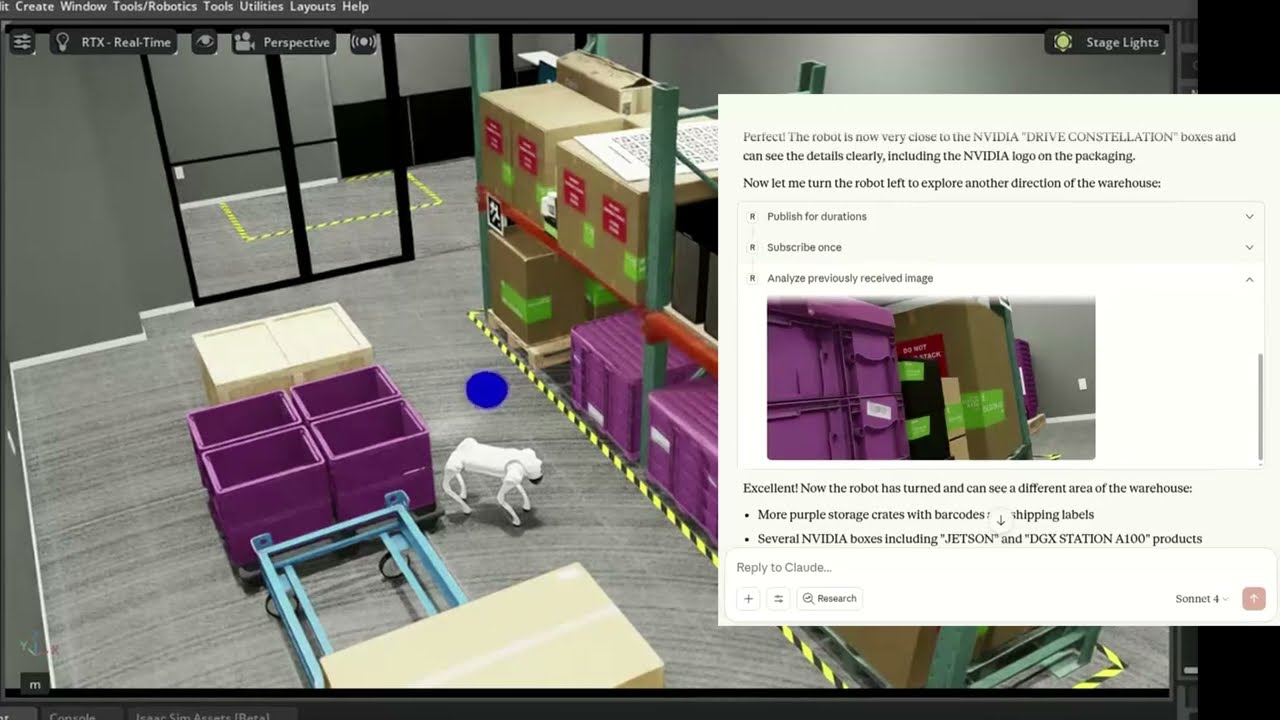
🐕 Example - Controlling Unitree Go2 in NVIDIA Isaac Sim (video)
The MCP server connects Claude to a simulated Unitree Go2 quadruped in NVIDIA Isaac Sim, interpreting natural language commands to navigate and control the robot.
🛠 Getting Started
Follow the installation guide to get started.
ROS-MCP works with Claude Code, Codex CLI, Gemini CLI, Claude Desktop, ChatGPT, Cursor, or any MCP-compatible client.

📚 More Examples & Tutorials
Browse our examples to see the server in action.
We welcome community PRs with new examples and integrations!
🤝 Contributing
We love contributions of all kinds:
- Bug fixes and documentation updates
- New features (e.g., Action support, permissions)
- Additional examples and tutorials
Check out the contributing guidelines and see issues tagged good first issue to get started.
📜 License
This project is licensed under the Apache License 2.0.
Featured
Keep your Mac awake while Claude Code and 40+ AI agents run. Sleeps when they're idle.
One time payment $9 →Integrate web data into your AI product. One API to scrape website & brand data.
Get API Key Now →Agent, run crypto. Access onchain data & trade routes via 1inch.
Install now →On Capafy, your Skill runs online 24/7 as an agent product, and you get paid every time someone uses it.
Start earning →Registryactive
Packageros-mcp
TransportSTDIO
Resources6
Prompts7
Tools verifiedJun 11, 2026
UpdatedJan 29, 2026