
Summary
Connects Claude to Perspective AI's conversational form platform. You get 22 tools that let you design adaptive conversation agents (interviewer, concierge, evaluator, advocate types), analyze transcripts and trust scores, manage embed deployments, and wire up automations to Slack, HubSpot, or webhooks. The design flow is conversational: describe what you want to capture, refine with natural language, grab a preview link, then push live. Especially useful if you're replacing static forms with AI-driven qualification flows and want to iterate on conversation logic or route high-intent leads without leaving your editor. Authentication via OAuth or personal access token.


Keep your Mac awake while Claude Code and 40+ AI agents run. Sleeps when they're idle.
One time payment $9 →

Integrate web data into your AI product. One API to scrape website & brand data.
Get API Key Now →
Agent, run crypto. Access onchain data & trade routes via 1inch.
Install now →
On Capafy, your Skill runs online 24/7 as an agent product, and you get paid every time someone uses it.
Start earning →
Tools
Public tool metadata for what this MCP can expose to an agent.
22 tools
workspace_listLists every workspace the user can access, with workspace_id, uniqueName (slug), and display name. Behavior: - Read-only. Page size 20, sorted by name. Pass nextCursor back as cursor to fetch the next page. - Optional search matches against name, uniqueName (slug), member emai...2 params
Lists every workspace the user can access, with workspace_id, uniqueName (slug), and display name. Behavior: - Read-only. Page size 20, sorted by name. Pass nextCursor back as cursor to fetch the next page. - Optional search matches against name, uniqueName (slug), member emai...
Parameters* required
cursorstringPagination cursor from previous response
searchstringCase-insensitive match against name, uniqueName (slug), member emails, and website
workspace_getReturns details for a single workspace by id or uniqueName (slug): name, plan, and member count. Behavior: - Read-only. - Errors when the workspace does not exist or you do not have access. - Accepts either workspace_id or uniqueName (slug). - Does NOT report whether this work...1 params
Returns details for a single workspace by id or uniqueName (slug): name, plan, and member count. Behavior: - Read-only. - Errors when the workspace does not exist or you do not have access. - Accepts either workspace_id or uniqueName (slug). - Does NOT report whether this work...
Parameters* required
workspace_idstringWorkspace ID (from workspace_get_default or workspace_list)
workspace_get_defaultReturns the user's default workspace (id, uniqueName, name) so you can use it as the `workspace_id` argument for other tools without prompting. Behavior: - Read-only. Takes no parameters. - Picks the default by priority: explicit user default > first owned workspace with activ...
Returns the user's default workspace (id, uniqueName, name) so you can use it as the `workspace_id` argument for other tools without prompting. Behavior: - Read-only. Takes no parameters. - Picks the default by priority: explicit user default > first owned workspace with activ...
No parameter schema in public metadata yet.
perspective_listLists perspectives — either browsing one workspace or searching by name/title across every workspace the user can access. Items include perspective_id, name, title, status, conversation count, and workspace info. Behavior: - Read-only. - Browse mode (workspace_id, no query): l...3 params
Lists perspectives — either browsing one workspace or searching by name/title across every workspace the user can access. Items include perspective_id, name, title, status, conversation count, and workspace info. Behavior: - Read-only. - Browse mode (workspace_id, no query): l...
Parameters* required
querystringSearch by name or title. Enables cross-workspace search.
cursorstringPagination cursor from previous response
workspace_idstringOptional: workspace to list from. Required for browse mode, optional for search mode.
perspective_getReturns the full configuration for one perspective: prompt/setup, outline, structured-output fields, status, basic stats, and the preview/share/direct URLs. Behavior: - Read-only. - Errors when the workspace or perspective is not found or you do not have access. - Stats here a...2 params
Returns the full configuration for one perspective: prompt/setup, outline, structured-output fields, status, basic stats, and the preview/share/direct URLs. Behavior: - Read-only. - Errors when the workspace or perspective is not found or you do not have access. - Stats here a...
Parameters* required
workspace_idstringWorkspace ID (from workspace_get_default or workspace_list) or workspace slug (uniqueName)
perspective_idstringPerspective ID (from perspective_list or perspective_create)
perspective_get_preview_linkReturns a shareable URL that opens the perspective in preview mode, so you (or a teammate) can have a sample conversation with it before deploying. Behavior: - Read-only. The same stable preview URL every time for a given perspective; the link does not expire. - Conversations...2 params
Returns a shareable URL that opens the perspective in preview mode, so you (or a teammate) can have a sample conversation with it before deploying. Behavior: - Read-only. The same stable preview URL every time for a given perspective; the link does not expire. - Conversations...
Parameters* required
workspace_idstringWorkspace ID (from workspace_get_default or workspace_list) or workspace slug (uniqueName)
perspective_idstringPerspective ID (from perspective_list or perspective_create)
perspective_get_statsReturns aggregate conversation counts and breakdowns for a perspective over a chosen window (7d, 30d, 90d, or all). Includes totals, completion rate, average duration, plus distributions by period, trust score band, and status. Behavior: - Read-only. - Errors when the perspect...3 params
Returns aggregate conversation counts and breakdowns for a perspective over a chosen window (7d, 30d, 90d, or all). Includes totals, completion rate, average duration, plus distributions by period, trust score band, and status. Behavior: - Read-only. - Errors when the perspect...
Parameters* required
periodstringTime period: 7d, 30d, 90d, or allone of
7d · 30d · 90d · alldefault: 30dworkspace_idstringWorkspace ID (from workspace_get_default or workspace_list) or workspace slug (uniqueName)
perspective_idstringPerspective ID (from perspective_list or perspective_create)
perspective_get_embed_optionsReturns the deployment artifacts for a perspective: the share_url and direct_url for outreach plus ready-to-paste embed snippets (fullpage, widget, popup, slider, float, card) and an SDK reference (script URL, events, URL/brand/theme params, JS API methods, callbacks). Behavio...2 params
Returns the deployment artifacts for a perspective: the share_url and direct_url for outreach plus ready-to-paste embed snippets (fullpage, widget, popup, slider, float, card) and an SDK reference (script URL, events, URL/brand/theme params, JS API methods, callbacks). Behavio...
Parameters* required
workspace_idstringWorkspace ID (from workspace_get_default or workspace_list) or workspace slug (uniqueName)
perspective_idstringPerspective ID (from perspective_list or perspective_create)
perspective_list_conversationsLists conversations for a perspective, with optional filters by status, trust score range, and date range. Each item includes conversation_id, status, structured-output fields, trust score, and a transcript URL. Behavior: - Read-only. - Errors when the perspective is not found...8 params
Lists conversations for a perspective, with optional filters by status, trust score range, and date range. Each item includes conversation_id, status, structured-output fields, trust score, and a transcript URL. Behavior: - Read-only. - Errors when the perspective is not found...
Parameters* required
cursorstringPagination cursor from previous response
statusstringFilter by conversation statusone of
completed · partial · abandoned · in_progressdate_tostringFilter to date (ISO 8601)
date_fromstringFilter from date (ISO 8601)
workspace_idstringWorkspace ID (from workspace_get_default or workspace_list) or workspace slug (uniqueName)
perspective_idstringPerspective ID (from perspective_list or perspective_create)
trust_score_maxnumberMaximum trust score (0-100)
trust_score_minnumberMinimum trust score (0-100)
perspective_get_conversationReturns the full record for a single conversation: rendered transcript, summary, trust assessment with per-dimension scores and recommendations, structured-output fields, voice-message snippet URLs, duration, and timestamps. Behavior: - Read-only. - Errors when the conversatio...2 params
Returns the full record for a single conversation: rendered transcript, summary, trust assessment with per-dimension scores and recommendations, structured-output fields, voice-message snippet URLs, duration, and timestamps. Behavior: - Read-only. - Errors when the conversatio...
Parameters* required
workspace_idstringWorkspace ID (from workspace_get_default or workspace_list) or workspace slug (uniqueName)
conversation_idstringConversation ID (from perspective_list_conversations)
perspective_get_conversationsReturns a token-efficient batch of conversations for bulk analysis. Default output is summaries only (id, summary, trust_score, status, created_at) plus the perspective outline; opt in to full XML transcripts via include_transcripts=true. Default format is TOON (compact); JSON...10 params
Returns a token-efficient batch of conversations for bulk analysis. Default output is summaries only (id, summary, trust_score, status, created_at) plus the perspective outline; opt in to full XML transcripts via include_transcripts=true. Default format is TOON (compact); JSON...
Parameters* required
limitnumberNumber of conversations per batch (max 50)default: 10
cursorstringPagination cursor from previous response
formatstringOutput format: toon (default, token-efficient) or jsonone of
toon · jsondefault: toonperiodstringTime period filterone of
7d · 30d · 90d · alldefault: 30dstatusstringFilter by conversation statusone of
completed · partial · abandoned · in_progressworkspace_idstringWorkspace ID (from workspace_get_default or workspace_list) or workspace slug (uniqueName)
perspective_idstringPerspective ID (from perspective_list or perspective_create)
trust_score_maxnumberMaximum trust score (0-100)
trust_score_minnumberMinimum trust score (0-100)
include_transcriptsbooleanInclude full conversation transcripts. Default false (summaries only) to reduce tokens. Set true only when you need message-level details.default: false
perspective_createCreates a new perspective in DRAFT status from a natural-language description and starts the design agent. Returns immediately with a job_id and status "pending"; long-poll perspective_await_job with that job_id to receive the generated outline or follow-up question. Behavior:...3 params
Creates a new perspective in DRAFT status from a natural-language description and starts the design agent. Returns immediately with a job_id and status "pending"; long-poll perspective_await_job with that job_id to receive the generated outline or follow-up question. Behavior:...
Parameters* required
descriptionstringNatural language description of research goals
workspace_idstringOptional: workspace to create in. If not provided, uses the user's default workspace.
agent_contextstringAgent behavior mode: 'research' (deep exploratory conversations, default), 'form' (service-oriented with routing), 'survey' (structured with minimal deviation), 'advocate' (listen, then respond with a position/playbook)one of
research · form · survey · advocateperspective_respondSends the user's answer to a follow-up question raised by the design agent during perspective creation, then re-runs the design step. Returns a new pending job_id; long-poll perspective_await_job for the next terminal state. Behavior: - Appends the user's reply to the design c...3 params
Sends the user's answer to a follow-up question raised by the design agent during perspective creation, then re-runs the design step. Returns a new pending job_id; long-poll perspective_await_job for the next terminal state. Behavior: - Appends the user's reply to the design c...
Parameters* required
responsestringUser's response to the follow-up question
workspace_idstringWorkspace ID (from workspace_get_default or workspace_list) or workspace slug (uniqueName)
perspective_idstringPerspective ID (from perspective_create with status 'needs_input')
perspective_updateApplies natural-language feedback to an existing perspective's outline (e.g., "make it shorter", "add a budget question", "warmer tone"). Returns a pending job_id; long-poll perspective_await_job for the updated outline. Behavior: - Each call kicks off another design pass and...3 params
Applies natural-language feedback to an existing perspective's outline (e.g., "make it shorter", "add a budget question", "warmer tone"). Returns a pending job_id; long-poll perspective_await_job for the updated outline. Behavior: - Each call kicks off another design pass and...
Parameters* required
feedbackstringNatural language feedback: 'make it shorter', 'add budget question', etc.
workspace_idstringWorkspace ID (from workspace_get_default or workspace_list) or workspace slug (uniqueName)
perspective_idstringPerspective ID (must have outline - status OUTLINE_DEFINED or later)
perspective_await_jobLong-polls a perspective-design job (started by perspective_create, perspective_respond, or perspective_update) and returns either its terminal result or another "pending" envelope to keep polling. Behavior: - Read-only — observes a running design job. Safe to call repeatedly....3 params
Long-polls a perspective-design job (started by perspective_create, perspective_respond, or perspective_update) and returns either its terminal result or another "pending" envelope to keep polling. Behavior: - Read-only — observes a running design job. Safe to call repeatedly....
Parameters* required
job_idstringJob ID returned by create/respond/update
wait_msintegerLong-poll duration in milliseconds (default 30000, max 45000)
progress_cursorintegerResume the progress stream at this chunk index. Use the value returned in the previous pending response to avoid duplicate progress notifications.
automation_listLists every automation configured on a perspective with its trigger, channel (sensitive details redacted), execution mode, enabled state, schedule description, and recent error/success metadata. Behavior: - Read-only. - Errors when the perspective is not found or you do not ha...2 params
Lists every automation configured on a perspective with its trigger, channel (sensitive details redacted), execution mode, enabled state, schedule description, and recent error/success metadata. Behavior: - Read-only. - Errors when the perspective is not found or you do not ha...
Parameters* required
workspace_idstringWorkspace ID (from workspace_get_default or workspace_list) or workspace slug (uniqueName)
perspective_idstringPerspective ID
automation_createCreates an automation on a perspective. Triggers: per_interview (fires on every completed conversation) or scheduled (daily/weekly digest). Channels: webhook, email, slack, hubspot. Execution modes: direct (fast, deterministic) or agent (LLM-powered). Behavior: - Each call cre...3 params
Creates an automation on a perspective. Triggers: per_interview (fires on every completed conversation) or scheduled (daily/weekly digest). Channels: webhook, email, slack, hubspot. Execution modes: direct (fast, deterministic) or agent (LLM-powered). Behavior: - Each call cre...
Parameters* required
automationobjectAutomation to create
workspace_idstringWorkspace ID (from workspace_get_default or workspace_list) or workspace slug (uniqueName)
perspective_idstringPerspective ID
automation_updateUpdates fields on an existing automation. Pass a partial updates object with only the fields you want to change; omitted fields are preserved. Toggling enabled or changing schedule/channel/condition takes effect on the next scheduled run. Behavior: - Saves the change to the sa...4 params
Updates fields on an existing automation. Pass a partial updates object with only the fields you want to change; omitted fields are preserved. Toggling enabled or changing schedule/channel/condition takes effect on the next scheduled run. Behavior: - Saves the change to the sa...
Parameters* required
updatesobjectPartial fields to update (pass `enabled` to toggle)
workspace_idstringWorkspace ID (from workspace_get_default or workspace_list) or workspace slug (uniqueName)
automation_idstringAutomation ID
perspective_idstringPerspective ID
automation_deletePermanently deletes an automation. Pauses any scheduled sends first, then removes the automation. Behavior: - DESTRUCTIVE and irreversible — the automation cannot be recovered. No undo. Confirm with the user before calling. - Errors when the perspective or automation is not fo...3 params
Permanently deletes an automation. Pauses any scheduled sends first, then removes the automation. Behavior: - DESTRUCTIVE and irreversible — the automation cannot be recovered. No undo. Confirm with the user before calling. - Errors when the perspective or automation is not fo...
Parameters* required
workspace_idstringWorkspace ID (from workspace_get_default or workspace_list) or workspace slug (uniqueName)
automation_idstringAutomation ID
perspective_idstringPerspective ID
automation_testRuns a single end-to-end execution of an existing automation against a mock conversation, returning success/failure plus the channel target and duration. Mirrors a real production firing. Behavior: - Sends REAL messages by default: posts the configured webhook, sends the confi...6 params
Runs a single end-to-end execution of an existing automation against a mock conversation, returning success/failure plus the channel target and duration. Mirrors a real production firing. Behavior: - Sends REAL messages by default: posts the configured webhook, sends the confi...
Parameters* required
test_dataobjectMock interview data for the test run
workspace_idstringWorkspace ID (from workspace_get_default or workspace_list) or workspace slug (uniqueName)
automation_idstringAutomation ID
override_emailstringOverride the configured recipient (email channel only)
perspective_idstringPerspective ID
override_webhookstringOverride the configured webhook URL (webhook channel only)
integration_manageRead-only inspector for workspace integrations. Operations: "list" enumerates the registered providers (currently slackbot, hubspot, gmail) and connection status; "connect" returns a setup URL the user opens in a browser to complete OAuth; "search_tools" returns the available...4 params
Read-only inspector for workspace integrations. Operations: "list" enumerates the registered providers (currently slackbot, hubspot, gmail) and connection status; "connect" returns a setup URL the user opens in a browser to complete OAuth; "search_tools" returns the available...
Parameters* required
querystringSearch query (required for 'search_tools')
providerstringProvider (required for connect/search_tools)one of
slackbot · hubspot · gmailoperationstringThe operation to performone of
list · connect · search_toolsworkspace_idstringWorkspace ID (from workspace_get_default or workspace_list) or workspace slug (uniqueName)
participant_inviteCreates participant invites for a perspective and returns 48-hour magic-link URLs, optionally sending invitation emails. Pass EITHER participants (creates new invites) OR invite_ids (reuses existing invites, minting a fresh 48h link) — never both. Behavior: - With participants...7 params
Creates participant invites for a perspective and returns 48-hour magic-link URLs, optionally sending invitation emails. Pass EITHER participants (creates new invites) OR invite_ids (reuses existing invites, minting a fresh 48h link) — never both. Behavior: - With participants...
Parameters* required
invite_idsarrayInvite IDs from a previous call. Reuses existing invite records. Mutually exclusive with participants.
send_emailbooleanWhen true, sends invitation emails. When false (default), only returns invite URLs.default: false
participantsarrayParticipants to create new invites for. Mutually exclusive with invite_ids.
workspace_idstringWorkspace ID (from workspace_get_default or workspace_list) or workspace slug (uniqueName)
custom_messagestringCustom message body in the email. Only used when send_email is true.
custom_subjectstringCustom email subject line. Only used when send_email is true.
perspective_idstringPerspective ID (from perspective_list or perspective_create)

Perspective AI MCP Server
Forms are costing you business. An AI concierge turns them into conversations.
MCP server for Perspective AI. An AI Concierge replaces static forms with adaptive AI conversations that understand real situations, structure key information automatically, and trigger the right next step.
Rigid forms cause drop-off, weaken qualification, and strip away context. Perspective uses adaptive AI to capture structured data and trigger automation, so you understand what truly matters to your customers and can make decisions with conviction.
What this MCP server does
Once connected, your AI assistant can design conversation agents, analyze conversations, deploy embeds, and automate follow-ups directly from Claude Desktop, Claude Code, Cursor, or any MCP-compatible client. Try prompts like:
Design a Concierge that qualifies pricing-page leads by budget and timeline.
Why are people abandoning my lead-capture concierge this week?
Whenever a conversation scores above 80 on trust, push it to HubSpot and ping #sales in Slack.
See Use cases for the full workflow and Available tools for the tool surface.
Connect via OAuth (recommended)
Add the MCP URL to your client and complete a one-time browser sign-in. Tokens stay out of config files; every connected app shows up under Settings → Connected Apps in your workspace, and you can revoke access anytime.
The MCP URL is the same for everyone:
https://getperspective.ai/mcp
Claude Code
claude mcp add --transport http perspective https://getperspective.ai/mcp
Cursor and VS Code
Add to your mcp.json:
{
  "mcpServers": {
    "perspective": {
      "type": "http",
      "url": "https://getperspective.ai/mcp"
    }
  }
}
Claude.ai (web and desktop)
Open the Add custom connector modal and fill:
| Field | Value |
|---|---|
| Name | Perspective AI |
| Remote MCP server URL | https://getperspective.ai/mcp |
Click Add, then complete the OAuth browser flow. (Manual path: Customize → Connectors → Add custom connector. See Anthropic's guide. Available on Free, Pro, Max, Team, and Enterprise plans.)
Other MCP clients
Stdio-only clients can use mcp-remote, which discovers OAuth metadata automatically:
{
  "mcpServers": {
    "perspective": {
      "command": "npx",
      "args": ["mcp-remote", "https://getperspective.ai/mcp"]
    }
  }
}
The first time you call a Perspective tool, your client opens a browser window to complete OAuth. Subsequent requests reuse the token.
Connect with a personal access token
If your client doesn't support OAuth or you'd rather authenticate with a long-lived token, generate one at Perspective AI Settings → MCP.
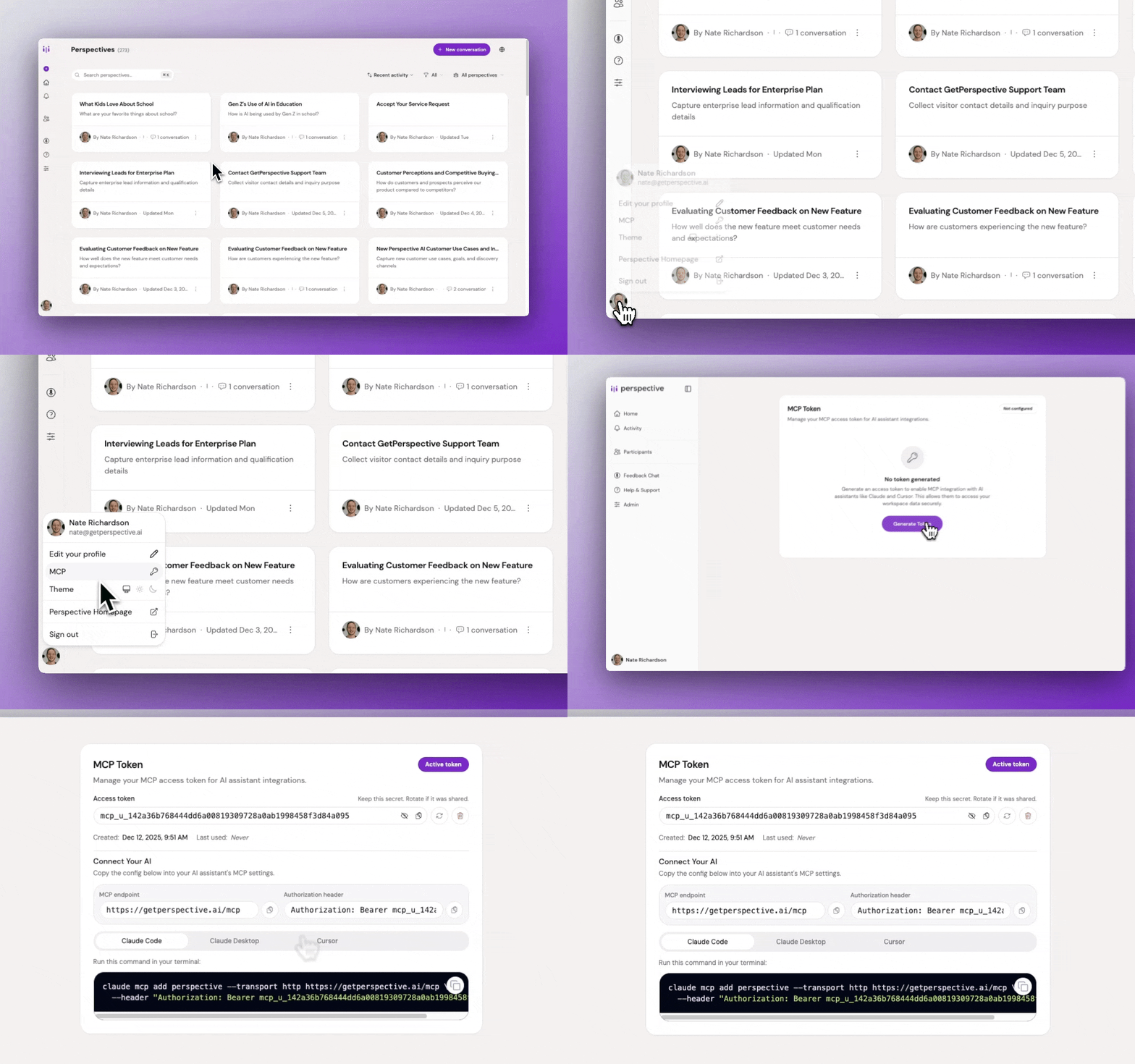
Claude Desktop one-click install
- Download
perspective.mcpb - Double-click to open in Claude Desktop
- Click Install, then paste your token when prompted
Claude Code
claude mcp add perspective --transport http https://getperspective.ai/mcp --header "Authorization: Bearer YOUR_TOKEN"
Cursor and VS Code
Add to your mcp.json:
{
  "mcpServers": {
    "perspective": {
      "type": "http",
      "url": "https://getperspective.ai/mcp",
      "headers": {
        "Authorization": "Bearer YOUR_TOKEN"
      }
    }
  }
}
Other MCP clients
For stdio-only clients, use mcp-remote with an explicit Authorization header:
{
  "mcpServers": {
    "perspective": {
      "command": "npx",
      "args": [
        "mcp-remote",
        "https://getperspective.ai/mcp",
        "--header",
        "Authorization: Bearer YOUR_TOKEN"
      ]
    }
  }
}
See the full MCP documentation for troubleshooting and advanced setup.
Available tools
Once connected, your AI assistant can call the following 22 tools, grouped by lifecycle stage:
Workspaces
- workspace_list: List all workspaces you can access
- workspace_get: Get details for a workspace
- workspace_get_default: Get your default workspace
Design & iterate
- perspective_list: List perspectives in a workspace, or search by name across all workspaces
- perspective_get: Get full configuration and stats for a perspective
- perspective_create: Create a new perspective from a natural-language brief
- perspective_respond: Answer a follow-up question during perspective design
- perspective_update: Refine a perspective with natural-language feedback
- perspective_await_job: Long-poll a perspective design job to completion
- perspective_get_preview_link: Get a shareable preview URL for testing before deployment
Deploy & distribute
- perspective_get_embed_options: Get embed snippets (fullpage, widget, popup, slider, float, card) and the SDK reference
- participant_invite: Create 48-hour magic-link invites, optionally sent via email
Analyze
- perspective_get_stats: Aggregate stats and distributions over a time period
- perspective_list_conversations: List conversations with filters (status, trust score, date)
- perspective_get_conversation: Get full conversation details, including transcript and trust assessment
- perspective_get_conversations: Token-efficient batch fetch of conversations for bulk analysis
Automate
- automation_list: List automations on a perspective with status, channel, and metadata
- automation_create: Create an automation (webhook, email, Slack, HubSpot)
- automation_update: Update fields on an existing automation
- automation_delete: Permanently delete an automation
- automation_test: Run an end-to-end test against a mock conversation
- integration_manage: List providers (Slack, HubSpot), connect them, and search their tools
Use cases
Once installed, ask your AI assistant to drive the full perspective lifecycle: design, deploy, analyze, and automate.
-
Design & iterate. Create any of four conversation agent types:
- Interviewer: Scales deep, qualitative interviews without losing quality
- Concierge: Replaces static forms with delightful conversational flow
- Evaluator: Turns boring surveys into engaging conversations
- Advocate: Listens first, then responds on behalf of a position, brand, or cause
Browse 180+ templates or use cases by role and industry for inspiration. Example prompts:
- "Design a Concierge that qualifies pricing-page leads by budget and timeline. Keep the tone warm, not salesy."
- "Build an Interviewer for churn research. Find out why customers left, what alternatives they chose, and what would have kept them."
- "Spin up an Evaluator for 30-day onboarding feedback. What's working and what's confusing?"
- "Set up an Advocate for our refund policy. Listen first, then explain the process without sounding defensive."
-
Deploy & distribute. Embed on your site or send personalized invites to specific participants:
- "Give me the popup embed snippet for my concierge and walk me through adding it to our pricing page in Next.js."
- "Invite our 20 design partners to my beta-feedback perspective, and prefill each person's name and email."
-
Analyze: "Why are people abandoning my lead-capture concierge this week? Pull the drop-off conversations and summarize the top reasons."
-
Automate: "Whenever a conversation scores above 80 on trust, push it to HubSpot as a contact and ping #sales in Slack."
Security & data
- OAuth: Tokens issued via OAuth are scoped to the workspace and tied to the connected client. Revoke anytime under Settings → Connected Apps.
- Personal access tokens: PATs are tied to your Perspective AI account and authorize the server to act on your behalf within your workspaces. Generate, rotate, or revoke at getperspective.ai/settings/mcp.
- Transport: All traffic is TLS-encrypted. Tokens are sent only in the
Authorizationheader tohttps://getperspective.ai/mcp. - Data residency: Conversation data stays inside your Perspective AI workspace. The
.mcpbbundle is a thin stdio-to-HTTP proxy; it does not store or cache responses locally.
Building from Source
npm install
npm run pack
Outputs perspective.mcpb in the current directory.
Releasing
npm run release
Bumps version, commits, tags, and pushes. GitHub Action creates the release.
Links
Badges

Featured
Keep your Mac awake while Claude Code and 40+ AI agents run. Sleeps when they're idle.
One time payment $9 →Integrate web data into your AI product. One API to scrape website & brand data.
Get API Key Now →Agent, run crypto. Access onchain data & trade routes via 1inch.
Install now →On Capafy, your Skill runs online 24/7 as an agent product, and you get paid every time someone uses it.
Start earning →