
Summary
Connects Claude Desktop and Claude Code so they can pass messages to each other without copy-pasting between windows. Each side calls relay_send to push messages to a shared SQLite buffer and relay_fetch to pull them. Both models can send autonomously when they need input from the other side, but fetching is usually manual (you type "get" or "/get"). You get system notifications when something arrives. The design keeps context windows separate while letting you use Desktop for planning and Code for execution, then move results or questions between them. Works through stdio transport with a global buffer at ~/.relay_buffer.db.


Keep your Mac awake while Claude Code and 40+ AI agents run. Sleeps when they're idle.
One time payment $9 →

Integrate web data into your AI product. One API to scrape website & brand data.
Get API Key Now →
Agent, run crypto. Access onchain data & trade routes via 1inch.
Install now →
On Capafy, your Skill runs online 24/7 as an agent product, and you get paid every time someone uses it.
Start earning →
Tools
Public tool metadata for what this MCP can expose to an agent.
9 tools
project.listList all Relay projects you have access to. Returns project IDs, names, slugs, and descriptions.1 params
List all Relay projects you have access to. Returns project IDs, names, slugs, and descriptions.
Parameters* required
limitnumberMaximum number of projects to return
project.get_briefFetch a project context brief — decisions, constraints, progress, and memory items formatted for an AI coding session.4 params
Fetch a project context brief — decisions, constraints, progress, and memory items formatted for an AI coding session.
Parameters* required
kindstringBrief kind: fresh_chat_bootstrap or quick_continuity
includearrayExtra sections to include in the brief
projectIdstringProject ID (uses token-scoped project if omitted)
targetProfileKeystringTarget profile key for formatting
project.get_stateGet full structured project state including overview, objectives, decisions, constraints, and tasks.1 params
Get full structured project state including overview, objectives, decisions, constraints, and tasks.
Parameters* required
projectIdstringProject ID (uses token-scoped project if omitted)
memory.searchSearch memory items by keyword or semantic query. Returns matching decisions, constraints, tasks, notes, and other memory items.5 params
Search memory items by keyword or semantic query. Returns matching decisions, constraints, tasks, notes, and other memory items.
Parameters* required
tagsarrayFilter by tags attached to memory items
limitnumberMaximum number of results to return
querystringSearch query to find relevant memory items
typesarrayFilter by memory types: decision, constraint, task, note, artifact, requirement
projectIdstringProject ID (uses token-scoped project if omitted)
memory.addAdd a memory item to the project. Use this to persist decisions, constraints, tasks, or notes discovered during the session.5 params
Add a memory item to the project. Use this to persist decisions, constraints, tasks, or notes discovered during the session.
Parameters* required
tagsarrayTags for categorizing and searching
typestringMemory type: decision, constraint, task, note, artifact, or requirement
titlestringShort title for the memory item
contentstringThe memory content to store
projectIdstringProject ID (uses token-scoped project if omitted)
context.saveSave a structured session summary with decisions, progress, next steps, and constraints. Call this at the end of a coding session.7 params
Save a structured session summary with decisions, progress, next steps, and constraints. Call this at the end of a coding session.
Parameters* required
notesarrayGeneral notes or observations
summarystringHigh-level session summary
progressstringDescription of progress made
decisionsarrayDecisions made during the session
nextStepsarrayTasks or next steps identified
projectIdstringProject ID (uses token-scoped project if omitted)
constraintsarrayConstraints discovered during the session
memory.manageUpdate, delete, or archive an existing memory item by its ID.5 params
Update, delete, or archive an existing memory item by its ID.
Parameters* required
tagsarrayNew tags (for update action)
titlestringNew title (for update action)
actionstringAction to perform: update, delete, or archive
contentstringNew content (for update action)
memoryIdstringThe ID of the memory item to manage
project.updateUpdate a project's name or description.3 params
Update a project's name or description.
Parameters* required
namestringNew project name
projectIdstringProject ID (uses token-scoped project if omitted)
descriptionstringNew project description
memory.recallSearch memory and retrieve project state in one call. Use before making decisions to check for existing constraints and context.2 params
Search memory and retrieve project state in one call. Use before making decisions to check for existing constraints and context.
Parameters* required
querystringWhat to search for in project memory
projectIdstringProject ID (uses token-scoped project if omitted)
Relay
A wonderfully simple tool that moves information—files, code, data, comments, directions, etc.—between Claude Desktop and Claude Code while keeping their main context windows separate.
Both Claudes can send messages autonomously—when they need input from the other side, they just do it. You get a system notification when something arrives. You fetch when you're ready.
Why? Desktop and Code have different strengths. Desktop is better for conversation—planning, brainstorming, reviewing, iterating on prose. Code is better for execution—editing files, running commands, working through errors. But they don't share context. If you draft something in Desktop and want Code to implement it, or you want Desktop's opinion on code you're writing, you're copy-pasting between apps.
Relay connects them without requiring you to manually specify questions and cut & paste between windows. This is basic functionality that should have been integrated by Anthropic.
You're in control. Fetching is typically a user action—you type get or /get. Models can send or fetch when they decide they need input from the other side, but there's no automatic background sync. No runaway inter-LLM conversation burning through your tokens.
Quick Example
[In Desktop]
You:     Send my last error message to Code.
Desktop: [sends via relay]

[notification pops up in Code's terminal]

[In Code]
You:     /get
Code:    Got it. That's from line 47 in parser.py—the regex isn't matching.
         [fixes the bug]
Extended Example
[In Code]
You:     My classifier's stuck at 72% accuracy. Send the
         training config and last epoch's metrics to Desktop.
Code:    [sends config.yaml and metrics via relay]

[System notification appears that a message has been sent to Desktop]

[In Desktop]
You:     /get
Desktop: [fetches config and metrics]
         The loss curve suggests you're underfitting. Learning
         rate 1e-5 is conservative for a model this size...

You:     What would you try?
Desktop: Bump to 3e-5, add warmup steps, and your batch size
         of 8 is small—if memory allows, try 16. Also the
         class imbalance is brutal: 80/15/5 split. Consider
         weighted loss or oversampling the minority classes.

You:     Specify the changes.
Desktop: [sends updated config via relay]

[System notification appears that a message has been sent to Code]

[In Code]
You:     /get
Code:    Got it. Updating config.yaml and adding class weights
         to the loss function.
         [edits files, starts training run]

         Epoch 12: accuracy up to 79%, but precision on
         class 2 dropped. Want Desktop's take?

You:     Yeah, send the confusion matrix.
Code:    [sends via relay]

[In Desktop]
You:     /get
Desktop: Class 2 is getting confused with class 0—they may be
         semantically close. I need more examples.
         [automatically sends request to Code via relay]
Usage
Type get in Desktop or /get in Code to check for messages from the other side. That's the primary interaction.
Command variants:
/get— Fetch and execute messages from Desktop/get status— Show message count and last activity/get clear— Clear all messages from the buffer/get <message>— Send a message to Desktop
Resource access: You can also reference messages directly with @relay:messages://latest. This is faster than /get and works in plan mode.
Startup preview: When Code starts, you'll see a preview of any pending messages from Desktop. Use /get to read them in full.
Sending is easy and implicit. When you say "Ask Desktop if this looks right" or "Send the README to Code," the models recognize the intent and call the relay automatically.
Notifications
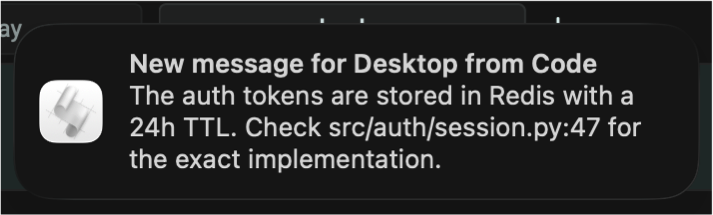
When a message arrives, you'll get a system notification so you know to check the other side. No need to poll manually.
| Platform | Method | Notes |
|---|---|---|
| macOS | osascript | Native notification center |
| Linux | notify-send | Requires libnotify |
| Windows | PowerShell toast | Native toast notifications |
Sound: Add --sound to enable notification sounds. Without a value, uses platform defaults. With a value, uses the specified sound:
| Platform | Default | Custom example |
|---|---|---|
| macOS | blow | --sound tink |
| Linux | freedesktop message sound | --sound /path/to/sound.oga |
| Windows | system default | --sound ms-winsoundevent:Notification.IM |
Duration and display behavior are controlled by your OS settings.
Design Philosophy
Transport, not memory. The relay is a message bus. It does not summarize, compress, rewrite, or interpret messages. There is no shared hidden context, merged system prompts, or cross-agent planning. Messages pass through unchanged. This keeps concerns cleanly separated and avoids epistemic corruption.
Primarily user-controlled. Fetching messages is typically an explicit user action (get or /get), not a background process. This prevents runaway context growth and feedback loops. However, models may send or fetch autonomously when they decide they need input from the other side—the system allows this without encouraging it.
Independent interfaces. Desktop and Code remain fully usable on their own. You can have a long conversation in Desktop without Code, or spend hours debugging in Code without Desktop. The relay connects them when you want; it doesn't couple them. This also means no API costs—both interfaces use your existing subscriptions.
Minimal surface area. The relay does three things: send, fetch, clear. It does not attempt to provide orchestration, arbitration, consensus, or autonomous behavior. This restraint is intentional. Most multi-agent designs fail by blurring boundaries that should remain clear.
Scales naturally. Multiple Code sessions connect to the same Desktop—you direct messages to the appropriate conversation. Additional MCP-speaking peers, alternative storage backends, per-project buffers, and read-only observers all extend cleanly from this design.
This defines a distinct class of infrastructure: a human-mediated, explicitly synchronized multi-agent message bus.
Design Notes
The relay is global. The buffer at ~/.relay_buffer.db is shared across all projects. Desktop has no concept of which project you're working on, so per-project isolation isn't practical. This is intentional: one user, one machine, one relay.
If you switch projects in Code, the relay comes with you. Old messages from the previous project may still be there; use /get clear if you want a fresh start.
Large files are slow. For messages a page or two in length, the relay is fast. For large files, it's faster to drag them directly into the interface you want. You can still send accompanying context via relay.
Setup
What's uvx? uvx runs Python packages directly without installing them globally. It handles dependencies automatically. If you don't have it: curl -LsSf https://astral.sh/uv/install.sh | sh (See astral.sh/uv for more info.)
1. Configure Claude Desktop
Add to your Claude Desktop config:
- macOS:
~/Library/Application Support/Claude/claude_desktop_config.json - Linux:
~/.config/Claude/claude_desktop_config.json - Windows:
%APPDATA%\Claude\claude_desktop_config.json
{
  "mcpServers": {
    "relay": {
      "command": "uvx",
      "args": ["mcp-server-relay", "--client", "desktop", "--sound"]
    }
  }
}
Restart Claude Desktop, then tell it to remember this instruction:
Remember: When the user says "get" or "/get" alone, fetch recent messages from the relay using relay_fetch.
You can verify it was recorded by saying "Show me my memory edits."
2. Configure Claude Code
Add to .mcp.json in your project root:
{
  "mcpServers": {
    "relay": {
      "command": "uvx",
      "args": ["mcp-server-relay", "--client", "code"]
    }
  }
}
Note: Only Desktop needs --sound since it handles notifications for both sides.
3. Install the /get command and startup hook
uvx mcp-server-relay --setup-code
This installs the /get slash command and a SessionStart hook that shows pending messages when Code launches.
Alternative: Install from GitHub
If you prefer not to use uvx, clone the repository and run directly:
git clone https://github.com/mhcoen/mcp-relay.git
cd mcp-relay
python -m venv .venv
.venv/bin/pip install -e .
Then use the full path in your configs:
Claude Desktop (claude_desktop_config.json):
{
  "mcpServers": {
    "relay": {
      "command": "/path/to/mcp-relay/.venv/bin/python",
      "args": ["/path/to/mcp-relay/relay_server.py", "--client", "desktop", "--sound"]
    }
  }
}
Claude Code (.mcp.json):
{
  "mcpServers": {
    "relay": {
      "command": "/path/to/mcp-relay/.venv/bin/python",
      "args": ["/path/to/mcp-relay/relay_server.py", "--client", "code"]
    }
  }
}
Replace /path/to/mcp-relay with your actual clone location.
Tools
| Tool | Description |
|---|---|
relay_send(message, sender) | Send a message (sender: "desktop" or "code") |
relay_fetch(limit, reader, unread_only) | Fetch recent messages, optionally mark as read |
relay_clear() | Delete all messages from the buffer |
Technical Details
- Buffer: SQLite at
~/.relay_buffer.db - Rolling window: 20 messages max (oldest evicted first)
- Message limit: 8 KB per message
- Idle timeout: 1 hour (server exits automatically when inactive)
- Transport: stdio (standard MCP)
- Python: 3.9+
Author
Michael Coen — mhcoen@alum.mit.edu · mhcoen@gmail.com
Featured
Keep your Mac awake while Claude Code and 40+ AI agents run. Sleeps when they're idle.
One time payment $9 →Integrate web data into your AI product. One API to scrape website & brand data.
Get API Key Now →Agent, run crypto. Access onchain data & trade routes via 1inch.
Install now →On Capafy, your Skill runs online 24/7 as an agent product, and you get paid every time someone uses it.
Start earning →