
Summary
If you're debugging minified JavaScript in production, this server maps error stack traces back to their original source using source maps. It exposes three main tools: parse_stack for translating line and column numbers from compiled code to source files with context, lookup_context for inspecting specific positions, and unpack_sources for extracting all original files from a map. You point it at a source map URL along with line and column numbers from an error stack, and it returns the original file path plus surrounding lines of code. The parser runs in WebAssembly for speed and includes configurable context window size. Handles both single traces and batch operations. Works over stdio transport with npx or as an embeddable npm package if you're building your own MCP server.


Keep your Mac awake while Claude Code and 40+ AI agents run. Sleeps when they're idle.
One time payment $9 →

Integrate web data into your AI product. One API to scrape website & brand data.
Get API Key Now →
Agent, run crypto. Access onchain data & trade routes via 1inch.
Install now →
On Capafy, your Skill runs online 24/7 as an agent product, and you get paid every time someone uses it.
Start earning →
Source Map Parser





This project implements a WebAssembly-based Source Map parser that can map JavaScript error stack traces back to source code and extract relevant context information. Developers can easily map JavaScript error stack traces back to source code for quick problem identification and resolution. This documentation aims to help developers better understand and use this tool.
MCP Integration
Note: Requires Node.js 20+ support
Option 1: Run directly with NPX
npx -y source-map-parser-mcp@latest
Option 2: Download the build artifacts
Download the corresponding version of the build artifacts from the GitHub Release page, then run:
node dist/main.es.js
Use as an npm package (bring your own MCP server)
You can embed the tools into your own MCP server process and customize behavior.
Install:
npm install source-map-parser-mcp
Minimal server (TypeScript):
import { McpServer } from '@modelcontextprotocol/sdk/server/mcp.js';
import { StdioServerTransport } from '@modelcontextprotocol/sdk/server/stdio.js';
import {
  registerTools,
  Parser,
  type ToolsRegistryOptions,
} from 'source-map-parser-mcp';

const server = new McpServer(
  { name: 'your-org.source-map-parser', version: '0.0.1' },
  { capabilities: { tools: {} } }
);

// Optional: control context lines via env
const options: ToolsRegistryOptions = {
  contextOffsetLine:
    Number(process.env.SOURCE_MAP_PARSER_CONTEXT_OFFSET_LINE) || 1,
};

registerTools(server, options);

// Start as stdio server
const transport = new StdioServerTransport();
await server.connect(transport);

// If you need programmatic parsing without MCP:
const parser = new Parser({ contextOffsetLine: 1 });
// await parser.parseStack({ line: 10, column: 5, sourceMapUrl: 'https://...' });
// await parser.batchParseStack([{ line, column, sourceMapUrl }]);
Build and Type Declarations
This project ships both ESM and CJS builds and a single bundled TypeScript declaration file.
- Build outputs:
- ESM:
dist/index.es.js - CJS:
dist/index.cjs.js - CLI entry:
dist/main.es.js - Types:
dist/index.d.ts(single bundled d.ts)
- ESM:
Quick build locally:
npm install
npm run build
Using types in your project:
import {
  Parser,
  registerTools,
  type ToolsRegistryOptions,
} from 'source-map-parser-mcp';
Runtime Parameter Configuration
System runtime parameters can be flexibly configured through environment variables to meet the needs of different scenarios
SOURCE_MAP_PARSER_RESOURCE_CACHE_MAX_SIZE: Sets the maximum memory space occupied by resource cache, default is 200MB. Adjusting this value appropriately can balance performance and memory usage.SOURCE_MAP_PARSER_CONTEXT_OFFSET_LINE: Defines the number of context code lines to display around the error location, default is 1 line. Increasing this value provides more context information, facilitating problem diagnosis.
Example:
# Set 500MB cache and display 3 lines of context
export SOURCE_MAP_PARSER_RESOURCE_CACHE_MAX_SIZE=500
export SOURCE_MAP_PARSER_CONTEXT_OFFSET_LINE=3
npx -y source-map-parser-mcp@latest
Feature Overview
- Stack Parsing: Parse the corresponding source code location based on provided line number, column number, and Source Map file.
- Batch Processing: Support parsing multiple stack traces simultaneously and return batch results.
- Context Extraction: Extract context code for a specified number of lines to help developers better understand the environment where errors occur.
- Context Lookup: Look up original source code context for specific compiled code positions.
- Source Unpacking: Extract all source files and their content from source maps.
MCP Service Tool Description
operating_guide
Get usage instructions for the MCP service. Provides information on how to use the MCP service through chat interaction.
parse_stack
Parse stack information by providing stack traces and Source Map addresses.
Request Example
- stacks: Stack information including line number, column number, and Source Map address.
- line: Line number, required.
- column: Column number, required.
- sourceMapUrl: Source Map address, required.
{
  "stacks": [
    {
      "line": 10,
      "column": 5,
      "sourceMapUrl": "https://example.com/source.map"
    }
  ]
}
Response Example
{
  "content": [
    {
      "type": "text",
      "text": "[{\"success\":true,\"token\":{\"line\":10,\"column\":5,\"sourceCode\":[{\"line\":8,\"isStackLine\":false,\"raw\":\"function foo() {\"},{\"line\":9,\"isStackLine\":false,\"raw\":\"  console.log('bar');\"},{\"line\":10,\"isStackLine\":true,\"raw\":\"  throw new Error('test');\"},{\"line\":11,\"isStackLine\":false,\"raw\":\"}\"}],\"src\":\"index.js\"}}]"
    }
  ]
}
lookup_context
Look up original source code context for a specific line and column position in compiled/minified code.
Request Example
- line: The line number in the compiled code (1-based), required.
- column: The column number in the compiled code, required.
- sourceMapUrl: The URL of the source map file, required.
- contextLines: Number of context lines to include (default: 5), optional.
{
  "line": 42,
  "column": 15,
  "sourceMapUrl": "https://example.com/app.js.map",
  "contextLines": 5
}
Response Example
{
  "content": [
    {
      "type": "text",
      "text": "{\"filePath\":\"src/utils.js\",\"targetLine\":25,\"contextLines\":[{\"lineNumber\":23,\"content\":\"function calculateSum(a, b) {\"},{\"lineNumber\":24,\"content\":\"  if (a < 0 || b < 0) {\"},{\"lineNumber\":25,\"content\":\"    throw new Error('Negative numbers not allowed');\"},{\"lineNumber\":26,\"content\":\"  }\"},{\"lineNumber\":27,\"content\":\"  return a + b;\"}]}"
    }
  ]
}
unpack_sources
Extract all source files and their content from a source map.
Request Example
- sourceMapUrl: The URL of the source map file to unpack, required.
{
  "sourceMapUrl": "https://example.com/bundle.js.map"
}
Response Example
{
  "content": [
    {
      "type": "text",
      "text": "{\"sources\":{\"src/index.js\":\"import { utils } from './utils.js';\\nconsole.log('Hello World!');\",\"src/utils.js\":\"export const utils = { add: (a, b) => a + b };\"},\"sourceRoot\":\"/\",\"file\":\"bundle.js\",\"totalSources\":2}"
    }
  ]
}
Parsing Result Description
success: Indicates whether the parsing was successful.token: The Token object returned when parsing is successful, containing source code line number, column number, context code, and other information.error: Error information returned when parsing fails.
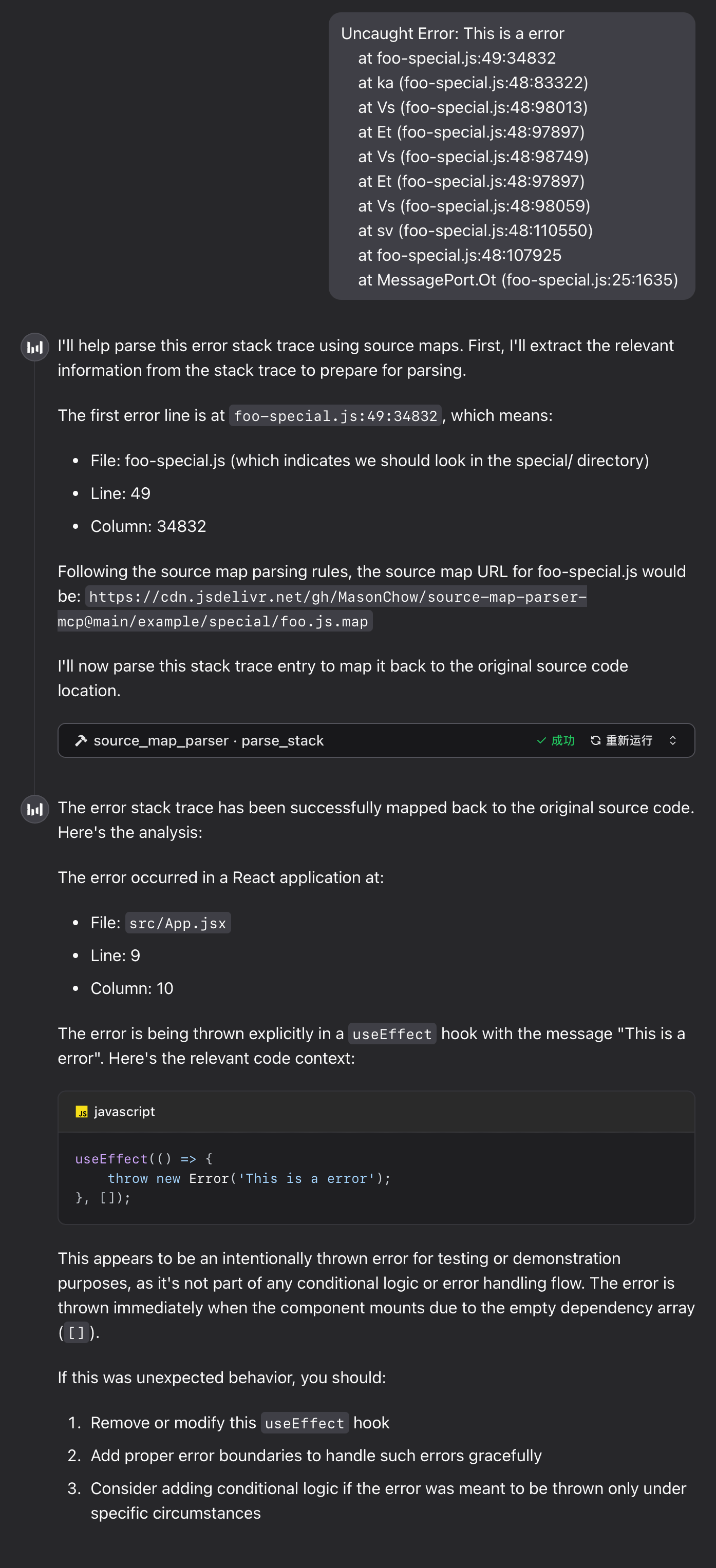
Example Run
System Prompt
According to actual needs, you can use system prompts to guide the model on how to parse stack information. For security or performance reasons, some teams may not want to expose Source Maps directly to the browser for parsing, but instead process the upload path of the Source Map. For example, converting the path bar-special.js to special/bar.js.map. In this case, you can instruct the model to perform path conversion through prompt rules.
Here is an example:
# Error Stack Trace Parsing Rules

When performing source map parsing, please follow these rules:

1. If the URL contains `special`, the file should be parsed into the `special/` directory, while removing `-special` from the filename.
2. All source map files are stored in the following CDN directory:
   `https://cdn.jsdelivr.net/gh/MasonChow/source-map-parser-mcp@main/example/`

## Examples

- Source map address for `bar-special.js`:
  `https://cdn.jsdelivr.net/gh/MasonChow/source-map-parser-mcp@main/example/special/bar.js.map`
Runtime Example
Error Stack
Uncaught Error: This is a error
    at foo-special.js:49:34832
    at ka (foo-special.js:48:83322)
    at Vs (foo-special.js:48:98013)
    at Et (foo-special.js:48:97897)
    at Vs (foo-special.js:48:98749)
    at Et (foo-special.js:48:97897)
    at Vs (foo-special.js:48:98059)
    at sv (foo-special.js:48:110550)
    at foo-special.js:48:107925
    at MessagePort.Ot (foo-special.js:25:1635)
FAQ
1. WebAssembly Module Loading Failure
If the tool returns the following error message, please troubleshoot as follows:
parser init error: WebAssembly.instantiate(): invalid value type 'externref', enable with --experimental-wasm-reftypes @+86
- Check Node.js Version: Ensure Node.js version is 20 or higher. If it's lower than 20, please upgrade Node.js.
- Enable Experimental Flag: If Node.js version is 20+ but you still encounter issues, use the following command to start the tool:
npx --node-arg=--experimental-wasm-reftypes -y source-map-parser-mcp@latest
Local Development Guide
1. Install Dependencies
Ensure Node.js and npm are installed, then run the following command to install project dependencies:
npm install
2. Link MCP Service
Run the following command to start the MCP server:
npx tsx src/main.ts
Internal Logic Overview
1. Main File Description
stack_parser_js_sdk.js: JavaScript wrapper for the WebAssembly module, providing core stack parsing functionality.parser.ts: Main implementation of the parser, responsible for initializing the WebAssembly module, retrieving Source Map content, and parsing stack information.server.ts: Implementation of the MCP server, providing theparse_stacktool interface for external calls.
2. Modify Parsing Logic
To modify the parsing logic, edit the getSourceToken method in the parser.ts file.
3. Add New Tools
In the server.ts file, new tool interfaces can be added using the server.tool method.
Notes
- Source Map Files: Ensure that the provided Source Map file address is accessible and the file format is correct.
- Error Handling: During parsing, network errors, file format errors, and other issues may be encountered; it's recommended to implement proper error handling when making calls.
Contribution Guidelines
Contributions via Issues and Pull Requests are welcome to improve this project.
License
This project is licensed under the MIT License. See the LICENSE file for details.
Featured
Keep your Mac awake while Claude Code and 40+ AI agents run. Sleeps when they're idle.
One time payment $9 →Integrate web data into your AI product. One API to scrape website & brand data.
Get API Key Now →Agent, run crypto. Access onchain data & trade routes via 1inch.
Install now →On Capafy, your Skill runs online 24/7 as an agent product, and you get paid every time someone uses it.
Start earning →Configuration
SOURCE_MAP_PARSER_CONTEXT_OFFSET_LINEContext lines around error locations in source code
SOURCE_MAP_PARSER_RESOURCE_CACHE_MAX_SIZEMaximum memory cache size in MB for source maps