
Summary
A freelancer-focused financial tracker that keeps everything in a local SQLite database and surfaces 43 tools through Claude. You can log expenses and income in natural language, generate invoices with automatic PDF output, set category budgets, handle recurring transactions, and export CSV reports for tax season. It includes multi-project tracking, supports English and German out of the box, and offers optional cloud sync through spendlog.dev. The entire setup runs via npx with auto-configuration for Claude Desktop and Code. Useful when you want expense tracking that lives in your conversational workflow rather than a separate app, and you're comfortable with local-first data storage that Claude can query and manipulate directly.


Keep your Mac awake while Claude Code and 40+ AI agents run. Sleeps when they're idle.
One time payment $9 →

Integrate web data into your AI product. One API to scrape website & brand data.
Get API Key Now →
Agent, run crypto. Access onchain data & trade routes via 1inch.
Install now →
On Capafy, your Skill runs online 24/7 as an agent product, and you get paid every time someone uses it.
Start earning →
Spendlog
Cost & expense tracking for solo entrepreneurs, right inside Claude Code. No apps. No spreadsheets. No account.
Track what your business spends, manage budgets, write invoices — all in natural language. Your data stays 100% local in SQLite. Nothing leaves your machine.




Works with
Claude Code | Claude Desktop | VS Code | Cursor
Quick Start
npx spendlog
Or one-click install:


The installer auto-configures Claude Desktop and Claude Code. Restart Claude, then try:
"Track 50€ for hosting"
That's it. Requires Node.js 20+.
Why Spendlog?
- Zero context-switching — log costs while you build, right where you already work
- Local-first — all data in
~/.spendlog/spendlog.db, no account, no cloud - Natural language — no forms, no menus, just tell Claude what you spent
- 38 tools — invoicing, budgets, recurring expenses, CSV export, multi-project tracking
- Multilingual — English and German (EN/DE), with i18n ready for more
Examples
Tracking:
You: "29€ for ChatGPT subscription"
Claude: Expense saved: 29.00 € — Category: IT & Software

You: "Export 2025 for my accountant"
Claude: 247 transactions written to ~/spendlog-export-2025.csv
Invoices:
You: "Create invoice for TechCorp, web development, 8h at 95€/h"
Claude: Invoice #2026-004 created — 760.00 €

You: "Mark it as paid"
Claude: Invoice #2026-004 marked as paid, income recorded.
Analysis:
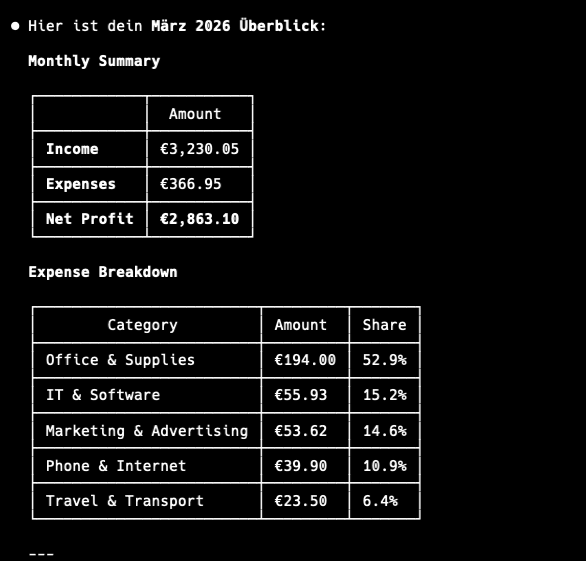
You: "How much did I spend on software this quarter?"
Claude: IT & Software: 287.00 € (12 transactions) — 23% of total expenses

You: "Compare January vs February"
Claude: Expenses up 15%. Biggest increase: Marketing (+120€)
Tools
38 tools across 9 categories:
| Category | Tools |
|---|---|
| Transactions | add_expense add_income list_transactions update_transaction delete_transaction |
| Analysis | get_summary get_category_breakdown compare_periods get_tax_summary |
| Invoices | create_invoice list_invoices get_invoice mark_invoice_sent mark_invoice_paid delete_invoice duplicate_invoice |
| Budgets | set_budget get_budget_status list_budgets update_budget delete_budget |
| Recurring | create_recurring list_recurring delete_recurring process_recurring |
| Projects | create_project list_projects rename_project delete_project |
| Categories | list_categories add_category delete_category |
| Export | export_transactions export_invoices export_for_tax_advisor |
| Settings | get_profile set_profile get_notifications |
Configuration
Manual setup (if the installer didn't work)
Claude Desktop — edit your config file:
{
  "mcpServers": {
    "spendlog": {
      "command": "npx",
      "args": ["-y", "--package=spendlog", "spendlog-mcp"]
    }
  }
}
Claude Code:
claude mcp add spendlog -- npx -y --package=spendlog spendlog-mcp
Environment variables
| Variable | Description | Default |
|---|---|---|
SPENDLOG_LANGUAGE | en or de | en |
SPENDLOG_DATA_DIR | Data directory path | ~/.spendlog |
DATABASE_PATH | Full path to SQLite database | $SPENDLOG_DATA_DIR/spendlog.db |
SPENDLOG_PROJECT | Default project for all transactions | none |
Privacy
All data stays on your machine, in a local SQLite file. No account, no cloud, no telemetry — nothing is ever sent anywhere.
Note: Spendlog is a cost tracker, not accounting software. Use it for your own insights, not official bookkeeping or tax filing.
Development
TypeScript (strict), Vitest for tests, TypeORM + SQLite for storage.
git clone https://github.com/makz81/spendlog.git
cd spendlog
npm install
npm run dev       # MCP server with watch mode
npm run test      # 382 tests
npm run typecheck # type check (no emit)
See CONTRIBUTING.md for architecture details and how to add new tools.
License
Featured
Keep your Mac awake while Claude Code and 40+ AI agents run. Sleeps when they're idle.
One time payment $9 →Integrate web data into your AI product. One API to scrape website & brand data.
Get API Key Now →Agent, run crypto. Access onchain data & trade routes via 1inch.
Install now →On Capafy, your Skill runs online 24/7 as an agent product, and you get paid every time someone uses it.
Start earning →