
Summary
This exposes episodic, semantic, and procedural memory for AI agents through MCP tools like `recall`, `remember`, `episode_start`, and `consolidate`. It runs offline first with SQLite and ONNX embeddings, scales to Postgres with pgvector, and uses an 8-signal fusion retrieval system that combines vector search, BM25, graph traversal, recency, frequency, and confidence scoring. Memories fade via FSRS forgetting curves and get promoted from episodic to semantic through consolidation. Reach for this when you need agent memory that persists across sessions and surfaces the right context without manual session management. It ships Python, TypeScript, and Go SDKs alongside the MCP server, plus framework adapters for LangChain, CrewAI, and AutoGen.


Keep your Mac awake while Claude Code and 40+ AI agents run. Sleeps when they're idle.
One time payment $9 →

Integrate web data into your AI product. One API to scrape website & brand data.
Get API Key Now →
Agent, run crypto. Access onchain data & trade routes via 1inch.
Install now →
On Capafy, your Skill runs online 24/7 as an agent product, and you get paid every time someone uses it.
Start earning →

Pensyve




Universal memory runtime for AI agents. Framework-agnostic, protocol-native, offline-first.
Without memory
User: "I prefer dark mode and use vim keybindings"
Agent: "Got it!"

[next session]

User: "Update my editor settings"
Agent: "What settings would you like to change?"
User: "I ALREADY TOLD YOU"
With Pensyve
# Session 1 — agent stores the preference
p.remember(entity=user, fact="Prefers dark mode and vim keybindings", confidence=0.95)

# Session 2 — agent recalls it automatically
memories = p.recall("editor settings", entity=user)
# → [Memory: "Prefers dark mode and vim keybindings" (score: 0.94)]
Your agent stops being amnesiac. Decisions, patterns, and outcomes persist across sessions — and the right context surfaces when it's needed.
Why Pensyve
| What you need | How Pensyve solves it |
|---|---|
| Agent forgets everything between sessions | Three memory types — episodic (what happened), semantic (what is known), procedural (what works) |
| Agent can't find the right memory | 8-signal fusion retrieval — vector similarity + BM25 + graph + intent + recency + frequency + confidence + type boost |
| Agent repeats failed approaches | Procedural memory — Bayesian tracking on action→outcome pairs surfaces what actually works |
| Memory store grows unbounded | FSRS forgetting curve — memories you use get stronger, unused ones fade naturally. Consolidation promotes repeated facts. |
| Need cloud signup to get started | Offline-first — SQLite + ONNX embeddings. Works on your laptop right now. No API keys needed. |
| Need to scale to production | Postgres backend — feature-gated pgvector for multi-node deployments. Managed service at pensyve.com. |
| Only works with one framework | Framework-agnostic — Python, TypeScript, Go, MCP, REST, CLI. Drop-in adapters for LangChain, CrewAI, AutoGen. |
Install
pip install pensyve          # Python (PyPI)
npm install @pensyve/sdk     # TypeScript (npm)
go get github.com/major7apps/pensyve/pensyve-go@latest  # Go
Or use the MCP server directly with Codex, Claude Code, Cursor, or any MCP client — see MCP Setup.
Quick Start
pip install pensyve
Episode: your agent remembers a conversation
import pensyve

p = pensyve.Pensyve()
user = p.entity("user", kind="user")

# Record a conversation — Pensyve captures it as episodic memory
with p.episode(user) as ep:
    ep.message("user", "I prefer dark mode and use vim keybindings")
    ep.message("agent", "Got it — I'll remember your editor preferences")
    ep.outcome("success")

# Later (even in a new session), the agent recalls what happened
results = p.recall("editor preferences", entity=user)
for r in results:
    print(f"[{r.score:.2f}] {r.content}")
Recall grouped: feed an LLM reader without rebuilding session blocks
When the consumer of recalled memories is another LLM (the dominant
"memory for an AI agent" pattern), recall_grouped() returns memories
already clustered by source session and ordered chronologically — ready
to format as session blocks in a reader prompt.
import pensyve

p = pensyve.Pensyve()
groups = p.recall_grouped("How many projects have I led this year?", limit=50)

# Each group is one conversation session — feed it to a reader directly.
for i, g in enumerate(groups, start=1):
    print(f"### Session {i} ({g.session_time}):")
    for m in g.memories:
        print(f"  {m.content}")
No more manual OrderedDict clustering, no more reordering by date string,
no more boilerplate every consumer has to reinvent.
Remember: store an explicit fact
p.remember(entity=user, fact="Prefers Python over JavaScript", confidence=0.9)
Procedural: the agent learns what works
# After a debugging session that succeeded:
ep.outcome("success")

# Pensyve tracks action→outcome reliability with Bayesian updates.
# Next time a similar issue comes up, recall surfaces the approach that worked.
Consolidate: memories stay clean
p.consolidate()
# Promotes repeated episodic facts to semantic knowledge
# Decays memories you never access via FSRS forgetting curve
Building from source
Prerequisites and build steps
git clone https://github.com/major7apps/pensyve.git && cd pensyve
uv sync --extra dev
uv run maturin develop --release -m pensyve-python/Cargo.toml
uv run python -c "import pensyve; print(pensyve.__version__)"
Interfaces
Pensyve exposes its core engine through multiple interfaces — use whichever fits your stack.
Python SDK
Direct in-process access via PyO3. Zero network overhead.
import pensyve

p = pensyve.Pensyve(namespace="my-agent")
entity = p.entity("user", kind="user")

# Remember a fact
p.remember(entity=entity, fact="User prefers Python", confidence=0.95)

# Recall memories (flat list)
results = p.recall("programming language", entity=entity)

# Recall memories clustered by source session — the canonical entry point
# for "memory as input to an LLM reader" workflows.
groups = p.recall_grouped("programming language", limit=50)

# Record an episode
with p.episode(entity) as ep:
    ep.message("user", "Can you fix the login bug?")
    ep.message("agent", "Fixed — the session token was expiring early")
    ep.outcome("success")

# Consolidate (promote repeated facts, decay unused memories)
p.consolidate()
MCP Server
Works with Claude Code, Cursor, and any MCP-compatible client.
cargo build --release --bin pensyve-mcp
{
  "mcpServers": {
    "pensyve": {
      "command": "./target/release/pensyve-mcp",
      "env": { "PENSYVE_PATH": "~/.pensyve/default" }
    }
  }
}
Tools exposed: recall, remember, episode_start, episode_end, forget, inspect, status, account
Claude Code Plugin
Full cognitive memory layer for Claude Code with 7 commands, 4 skills, 2 agents, and 6 lifecycle hooks.
Install from the marketplace:
/plugin marketplace add major7apps/pensyve
/plugin install pensyve@major7apps-pensyve
/reload-plugins
The plugin does not bundle an MCP server config — auth method and backend are user choices. Add an mcpServers.pensyve entry to your ~/.claude/settings.json (user-level) or .claude/settings.json (project-level). Pick one:
Pensyve Cloud — API key (recommended):
export PENSYVE_API_KEY="psy_your_key_here"
{
  "mcpServers": {
    "pensyve": {
      "type": "http",
      "url": "https://mcp.pensyve.com/mcp",
      "headers": {
        "Authorization": "Bearer ${PENSYVE_API_KEY}"
      }
    }
  }
}
Pensyve Cloud — OAuth (browser sign-in):
{
  "mcpServers": {
    "pensyve": {
      "type": "http",
      "url": "https://mcp.pensyve.com/mcp"
    }
  }
}
Pensyve Local (self-hosted, no API key):
Build the MCP binary first (see Install), then:
{
  "mcpServers": {
    "pensyve": {
      "command": "pensyve-mcp",
      "args": ["--stdio"]
    }
  }
}
Note: Use
headerswithAuthorization: Bearerfor remote MCP (HTTP transport). Use the top-levelenvblock (Claude Code MCP schema) for local stdio servers that read environment variables at startup.
Plugin contents:
├── 7 slash commands   /remember, /recall, /forget, /inspect, /consolidate, /memory-status, /using-pensyve
├── 4 skills           session-memory, memory-informed-refactor, context-loader, memory-review
├── 2 agents           memory-curator (background), context-researcher (on-demand)
└── 6 hooks            SessionStart, Stop, PreCompact, UserPromptSubmit, PostToolUse (Write/Edit, Bash)
See integrations/claude-code/README.md for full documentation.
Codex Plugin
First-class working memory for OpenAI Codex with a plugin manifest, bundled MCP server config, hooks, skills, /pensyve, and $pensyve skill invocation.
Add this repo as a Codex plugin marketplace, then install Pensyve:
codex plugin marketplace add major7apps/pensyve
codex plugin add pensyve@pensyve-codex
For local development from a checkout, use
codex plugin marketplace add /path/to/pensyve/integrations/codex-plugin instead.
Set your API key for the bundled MCP server:
export PENSYVE_API_KEY="psy_your_key_here"
The plugin bundles integrations/codex-plugin/.mcp.json, so Codex can load the Pensyve MCP server without copying a project config file. Use /skills, $pensyve, or /pensyve for explicit memory work, or let the bundled hooks and instructions prompt Codex to recall before substantive project decisions. @pensyve is documented as a text-level compatibility convention; true native Codex @-mention dispatch still needs platform support.
See integrations/codex-plugin/README.md for the manual fallback and local-stdio setup.
REST API
Rust/Axum gateway serving REST + MCP with auth, rate limiting, and usage metering.
cargo build --release --bin pensyve-mcp-gateway
./target/release/pensyve-mcp-gateway  # listens on 0.0.0.0:3000
# Remember
curl -X POST http://localhost:3000/v1/remember \
  -H "Content-Type: application/json" \
  -d '{"entity": "seth", "fact": "Seth prefers Python", "confidence": 0.95}'

# Recall
curl -X POST http://localhost:3000/v1/recall \
  -H "Content-Type: application/json" \
  -d '{"query": "programming language", "entity": "seth"}'

# Recall, clustered by source session (canonical for LLM-reader workflows)
curl -X POST http://localhost:3000/v1/recall_grouped \
  -H "Content-Type: application/json" \
  -d '{"query": "How many books did I buy?", "limit": 50, "order": "chronological"}'
Endpoints: GET /v1/health, POST /v1/recall, POST /v1/recall_grouped, POST /v1/remember, POST /v1/entities, DELETE /v1/entities/{name}, POST /v1/inspect, GET /v1/stats, PATCH /v1/memories/{id}, DELETE /v1/memories/{id}
TypeScript SDK
HTTP client with timeout, retry, and structured errors.
import { Pensyve } from "@pensyve/sdk";

const p = new Pensyve({
  baseUrl: "http://localhost:3000",
  timeoutMs: 10000,
  retries: 2,
});
await p.remember({ entity: "seth", fact: "Likes TypeScript", confidence: 0.9 });
const memories = await p.recall("programming", { entity: "seth" });

// Session-grouped recall — feed an LLM reader without rebuilding session blocks.
const { groups } = await p.recallGrouped("how many projects did I lead?", {
  limit: 50,
  order: "chronological",
});
for (const g of groups) {
  console.log(`### Session ${g.sessionId} (${g.sessionTime})`);
  for (const m of g.memories) console.log(`  ${m.content}`);
}
Go SDK
Context-aware HTTP client with structured errors.
import pensyve "github.com/major7apps/pensyve/pensyve-go"

client := pensyve.NewClient(pensyve.Config{BaseURL: "http://localhost:3000"})
ctx := context.Background()
client.Remember(ctx, "seth", "Likes Go", 0.9)
memories, _ := client.Recall(ctx, "programming", nil)
CLI
cargo build --bin pensyve-cli

# Recall memories (default output is JSON; use --format text for human-readable)
./target/debug/pensyve-cli recall "editor preferences" --entity user

# Show namespace status with memory counts
./target/debug/pensyve-cli status

# Show stats
./target/debug/pensyve-cli stats

# Inspect an entity
./target/debug/pensyve-cli inspect --entity user
Environment Variables
Pensyve uses the following environment variables across its components:
Core
| Variable | Default | Description |
|---|---|---|
PENSYVE_PATH | ~/.pensyve/<namespace> | SQLite database directory |
PENSYVE_NAMESPACE | default | Memory namespace name |
RUST_LOG | pensyve=info | Tracing filter (e.g. debug, pensyve=debug,hyper=warn) |
PENSYVE_ALLOW_MOCK_EMBEDDER | false | Fall back to mock embedder if real models unavailable |
Gateway / REST API
| Variable | Default | Description |
|---|---|---|
PENSYVE_API_KEYS | (empty) | Comma-separated valid API keys (standalone mode) |
PENSYVE_VALIDATION_URL | (none) | Remote endpoint for API key validation |
PENSYVE_RATE_LIMIT | 300 | Max requests per minute per API key |
HOST | 0.0.0.0 | Server bind address |
PORT | 3000 | Server bind port |
Cloud / Managed Service
| Variable | Default | Description |
|---|---|---|
PENSYVE_API_KEY | (none) | Cloud API key for remote mode |
PENSYVE_REMOTE_URL | http://localhost:8000 | Remote server URL |
PENSYVE_DATABASE_URL | (none) | Postgres connection string |
PENSYVE_REDIS_URL | (none) | Redis URL for episode state |
Quotas (managed service)
| Variable | Default | Description |
|---|---|---|
PENSYVE_MAX_NAMESPACES | unlimited | Max namespaces per account |
PENSYVE_MAX_MEMORIES | unlimited | Max total memories per account |
PENSYVE_MAX_RECALLS_PER_MONTH | unlimited | Max recall operations per month |
PENSYVE_MAX_STORAGE_BYTES | unlimited | Max storage bytes per account |
Optional Features
| Variable | Default | Description |
|---|---|---|
PENSYVE_TIER2_ENABLED | false | Enable Tier 2 LLM extraction |
PENSYVE_TIER2_MODEL_PATH | (none) | Path to GGUF model file |
PENSYVE_OTEL_ENDPOINT | (none) | OpenTelemetry collector URL |
Architecture
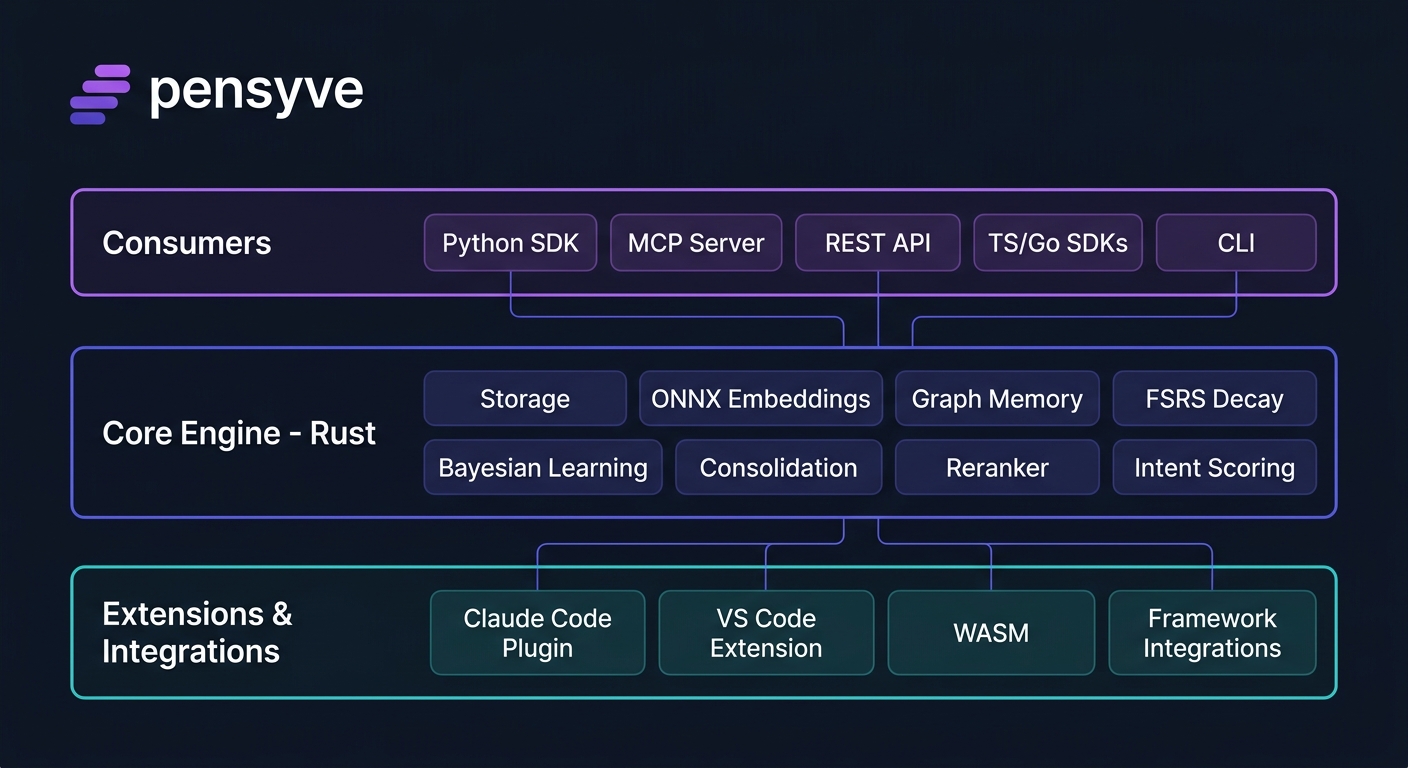
Data Model
Namespace (isolation boundary)
  └── Entity (agent | user | team | tool)
        ├── Episodes (bounded interaction sequences)
        │     └── Messages (role + content)
        └── Memories
              ├── Episodic  — what happened (timestamped, multimodal content type)
              ├── Semantic  — what is known (SPO triples with temporal validity)
              └── Procedural — what works (action→outcome with Bayesian reliability)
Retrieval Pipeline
- Embed query via ONNX (Alibaba-NLP/gte-base-en-v1.5, 768 dims)
- Classify intent — Question/Action/Recall/General (keyword heuristics)
- Vector search — cosine similarity against stored embeddings
- BM25 search — FTS5 lexical matching
- Graph traversal — petgraph BFS from query entity
- Fusion scoring — weighted sum of 8 signals (vector, BM25, graph, intent, recency, access, confidence, type boost)
- Cross-encoder reranking — BGE reranker on top-20 candidates
- FSRS reinforcement — retrieved memories get stability boost
Project Structure
pensyve/
├── pensyve-core/       Rust engine (rlib) — storage, embedding, retrieval, graph, decay, mesh, observability
├── pensyve-python/     Python SDK via PyO3 (cdylib)
├── pensyve-mcp/        MCP server binary (stdio, rmcp)
├── pensyve-cli/        CLI binary (clap)
├── pensyve-ts/         TypeScript SDK (bun) — timeout, retry, PensyveError
├── pensyve-go/         Go SDK — context-aware HTTP client
├── pensyve-wasm/       WASM build — standalone minimal in-memory Pensyve
├── pensyve_server/       Shared Python utilities — billing, extraction
├── integrations/       All integrations — IDE plugins, framework adapters, code harnesses
│   ├── claude-code/    Claude Code plugin (commands, skills, agents, hooks)
│   ├── vscode/         VS Code sidebar extension
│   ├── openclaw-plugin/ OpenClaw native memory plugin (TypeScript)
│   ├── opencode-plugin/ OpenCode native memory plugin (TypeScript)
│   ├── cursor/         Cursor MCP setup guide
│   ├── cline/          Cline MCP setup guide
│   ├── windsurf/       Windsurf MCP setup guide
│   ├── continue/       Continue MCP setup guide
│   ├── vscode-copilot/ VS Code Copilot Chat MCP setup guide
│   ├── langchain/      LangChain/LangGraph Python (PensyveStore + legacy PensyveMemory)
│   ├── langchain-ts/   LangChain.js/LangGraph.js TypeScript (PensyveStore)
│   ├── crewai/         CrewAI (PensyveStorage + standalone PensyveCrewMemory)
│   └── autogen/        Microsoft AutoGen multi-agent memory
├── tests/python/       Python integration tests
├── benchmarks/         LongMemEval_S evaluation + weight tuning
├── website/            Astro + Tailwind static site for pensyve.com
└── docs/               Architecture, roadmap, design specs, implementation plans
Development
First-Time Setup
# Install dependencies (creates .venv automatically)
uv sync --extra dev

# Build the native Python module (required before running any Python code)
uv run maturin develop --release -m pensyve-python/Cargo.toml

# Verify the module loads
uv run python -c "import pensyve; print(pensyve.__version__)"
Note: The
pensyvePython package is a native Rust extension built with PyO3. You must runuv run maturin developbeforepytestor any Python import ofpensyve, otherwise you will getModuleNotFoundError: No module named 'pensyve'.
Build & Test
make build      # Compile Rust + build PyO3 module
make test       # Run all tests (Rust + Python)
make lint       # clippy + ruff + pyright
make format     # cargo fmt + ruff format
make check      # lint + test (CI gate)
To run test suites individually:
cargo test --workspace                                       # Rust tests
uv run maturin develop --release -m pensyve-python/Cargo.toml  # Build PyO3 module first
uv run pytest tests/python/ -v                               # Python tests
cd pensyve-ts && bun test                                    # TypeScript tests
cd pensyve-go && go test ./...                               # Go tests
Additional SDKs
cd pensyve-ts && bun test          # TypeScript (38 tests)
cd pensyve-go && go test ./...     # Go (17 tests)
cd pensyve-wasm && cargo check     # WASM (standalone)
Benchmarks
# Synthetic recall smoke test (planted facts, no external dataset required)
python benchmarks/synthetic/run.py --generate --evaluate --verbose
Competitive Landscape
| What you need | Pensyve | Mem0 | Zep | Honcho |
|---|---|---|---|---|
| Works offline, no cloud required | Yes — SQLite, runs on your laptop | No — cloud API | No — requires server | No — cloud API |
| Agent learns from outcomes | Yes — procedural memory tracks what works | No | No | No |
| Finds memories by meaning | 8-signal fusion (vector + BM25 + graph + intent + 4 more) | Vector only | Vector + temporal | Vector only |
| Memories fade naturally | FSRS forgetting curve with reinforcement | No — manual cleanup | Basic TTL | No |
| Multi-turn conversation capture | Episodes with outcome tracking | Basic | Yes | Yes |
| Framework agnostic | Python, TypeScript, Go, MCP, REST, CLI | Python SDK | Python/JS | Python |
| Claude Code / Cursor / VS Code | Native plugins + MCP | No | No | No |
| Production-ready at scale | Postgres + pgvector (feature-gated) | Yes | Yes | Yes |
| Open source | Apache 2.0 | Yes | Partial | Yes |
License
Featured
Keep your Mac awake while Claude Code and 40+ AI agents run. Sleeps when they're idle.
One time payment $9 →Integrate web data into your AI product. One API to scrape website & brand data.
Get API Key Now →Agent, run crypto. Access onchain data & trade routes via 1inch.
Install now →On Capafy, your Skill runs online 24/7 as an agent product, and you get paid every time someone uses it.
Start earning →