
Summary
Bridges Claude and other AI agents directly to ITASCA PFC, the discrete element method simulation software. Exposes 10 tools split between documentation browsing (commands, Python API, reference docs across PFC 6.0, 7.0, and 9.0) and execution control (REPL, task submission, progress monitoring, interrupts, history). Setup requires a Python bridge running inside PFC's IPython console to handle the execution side, while doc tools work standalone. Useful if you're running particle simulations and want an agent that can navigate PFC's command hierarchy, test code interactively, and monitor long running DEM models without leaving the conversation.


Keep your Mac awake while Claude Code and 40+ AI agents run. Sleeps when they're idle.
One time payment $9 →

Integrate web data into your AI product. One API to scrape website & brand data.
Get API Key Now →
Agent, run crypto. Access onchain data & trade routes via 1inch.
Install now →
On Capafy, your Skill runs online 24/7 as an agent product, and you get paid every time someone uses it.
Start earning →

pfc-mcp




pfc3d>model new ;now, with LLM.
pfc-mcp connects AI agents to ITASCA PFC — Itasca's discrete element method (DEM) code — through the Model Context Protocol. Browse documentation, run simulations, and execute code, all through natural conversation.
pfc3d>model solve ;LLM solves.
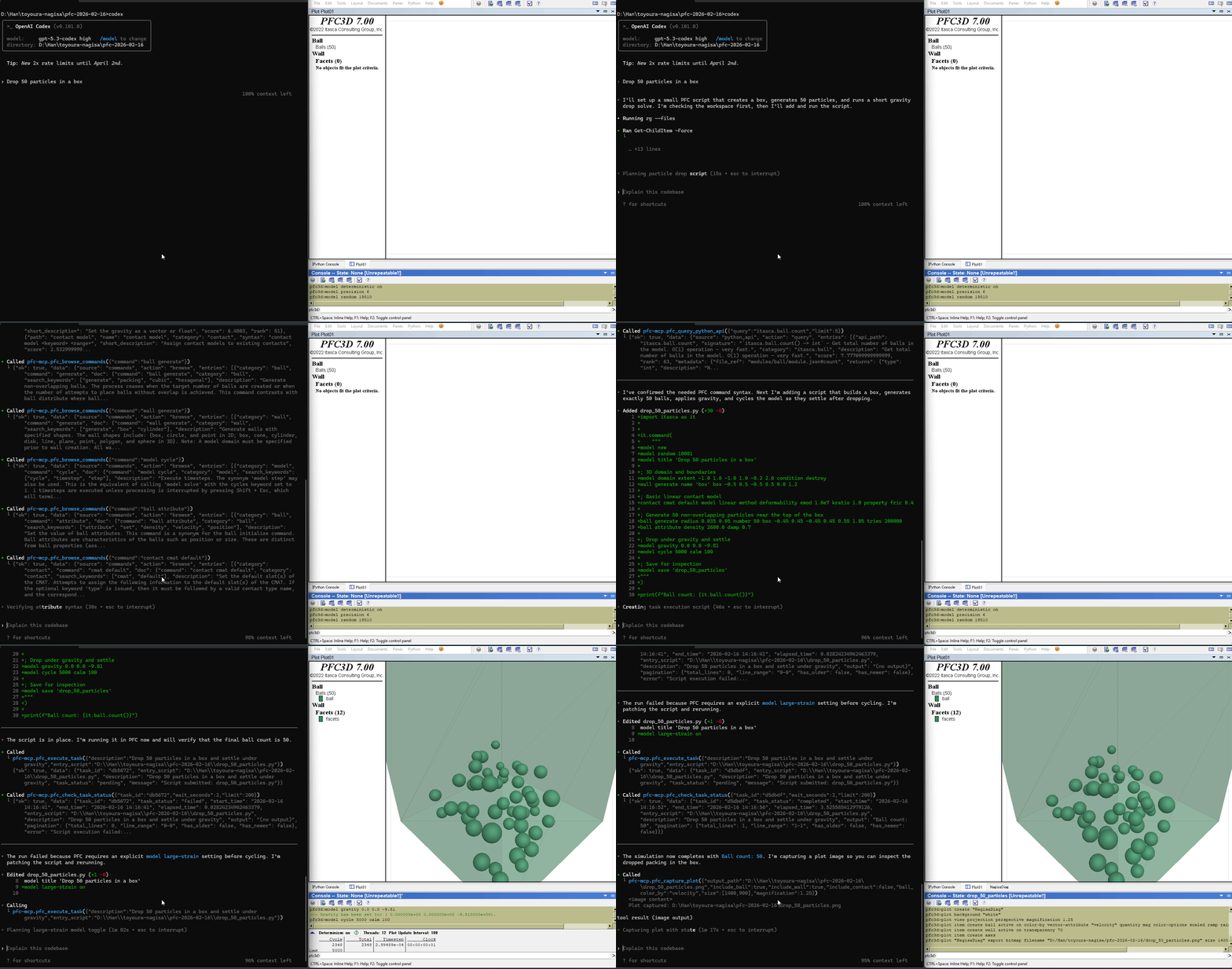
Tools (10)
5 documentation tools — browse and search PFC commands, Python API, and reference docs. No bridge required.
5 execution tools — interactive REPL, task submission, progress monitoring, interruption, and history. Requires bridge.
First-time Setup
Prerequisites
- ITASCA PFC 6.0, 7.0, or 9.0 installed
- uv installed (for
uvx)
Agentic Setup (Recommended)
Copy this to your AI agent and let it self-configure:
Fetch and follow this bootstrap guide end-to-end:
https://raw.githubusercontent.com/yusong652/pfc-mcp/main/docs/agentic/pfc-mcp-bootstrap.md
Manual Setup
1. Register the MCP server in your client config:
{
  "mcpServers": {
    "pfc-mcp": {
      "command": "uvx",
      "args": ["pfc-mcp"]
    }
  }
}
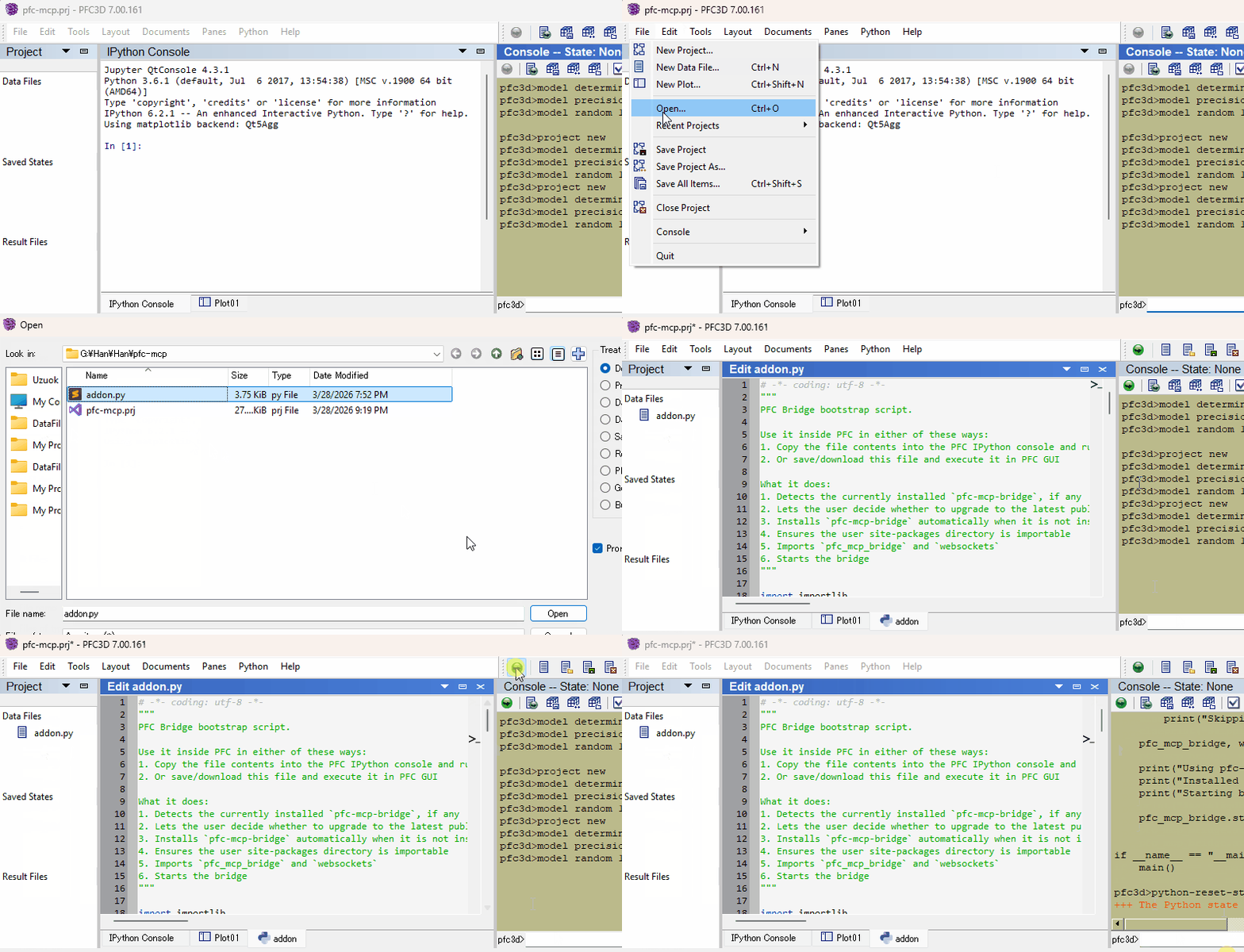
2. Start the bridge from inside PFC:
Download addon.py, then use either of these two flows inside PFC:
- Copy the file contents into the PFC IPython console and run them
- Or download the file and execute it in PFC GUI
Verify
Restart your AI agent (Claude Code, Codex CLI, Gemini CLI, etc.) and ask it to call pfc_execute_code to verify the connection.
Daily Startup
Once first-time setup is done, each new PFC session only needs the bridge re-started — run this in PFC's IPython console and you're back online:
import itasca_mcp_bridge
itasca_mcp_bridge.start()
start() checks PyPI for a newer bridge release and self-upgrades before starting. The MCP client config persists.
Features
- Multi-version PFC support - command docs for PFC 6.0, 7.0, and 9.0 via the
versionparameter - Hierarchical documentation browsing - agents navigate the PFC command tree to discover capabilities and boundaries, reducing hallucinated commands
- Enhanced plot documentation - plot items reference docs supplementing the official documentation
- Interactive REPL - rapid iteration before committing to full scripts; agents can quickly test and refine code
- Task lifecycle management - submit long-running simulations, monitor progress, interrupt running tasks, and browse task history
- Multi-client compatible - works with Claude Code, Codex CLI, Gemini CLI, GitHub Copilot CLI, OpenCode, toyoura-nagisa, and other MCP clients
Troubleshooting
See Troubleshooting in the bootstrap guide.
Development
See Developer Guide: Install and Run from Source.
Contributing
PRs and issues are welcome! See the Developer Guide to get started.
License
MIT - see LICENSE.
Featured
Keep your Mac awake while Claude Code and 40+ AI agents run. Sleeps when they're idle.
One time payment $9 →Integrate web data into your AI product. One API to scrape website & brand data.
Get API Key Now →Agent, run crypto. Access onchain data & trade routes via 1inch.
Install now →On Capafy, your Skill runs online 24/7 as an agent product, and you get paid every time someone uses it.
Start earning →