
Summary
Connects Gildara's prompt vault to any MCP-compatible AI tool through six core operations: list prompts, get prompt details, resolve prompts with operating contracts, run prompts with auto-repair and JSON validation, create new prompts, and browse blueprint templates. You get instant API provisioning with no signup through a curl command that returns a pvk_ key. Useful when you're managing reusable prompt libraries across teams or need structured prompt execution with contract assemblies and retry logic. Works with Claude Desktop, Cursor, Windsurf, or any stdio-based MCP client. The auto-repair feature handles schema validation failures automatically, which is helpful for production agent workflows that need reliability without manual intervention.


Keep your Mac awake while Claude Code and 40+ AI agents run. Sleeps when they're idle.
One time payment $9 →

Integrate web data into your AI product. One API to scrape website & brand data.
Get API Key Now →
Agent, run crypto. Access onchain data & trade routes via 1inch.
Install now →
On Capafy, your Skill runs online 24/7 as an agent product, and you get paid every time someone uses it.
Start earning →
Gildara MCP
One prompt vault. Every agent. Zero setup. Give Claude, Cursor, Windsurf, and Claude Code a shared, searchable prompt library that survives across chats, machines, and tools.
{ "mcpServers": { "gildara": { "command": "npx", "args": ["-y", "@gildara/mcp-server"] } } }
Paste into claude_desktop_config.json, restart Claude — your Gildara tools appear in Claude's tool list. No signup. No API key. The server auto-provisions a free agent on first run and prints a one-click link code to pair it with your account later.
→ Get started at gildara.io — pair your auto-provisioned agent to sync your vault and unlock Pro.
What your AI can do
- Search prompts semantically — find by meaning, not just keywords (Gemini embeddings).
- Resolve + run prompts — compiled system prompts with operating-contract sections assembled, auto-repair on JSON schema failures.
- Create + append — save new prompts, or append persistent facts to memory-type prompts.
- Dispatch briefs to agents — say "send this to gevorg" and the MCP server creates a Brief, ships it as a
.mdattachment to your paired Telegram chat, and @mentions the target agent's bot. One call closes the sketch-in-chat → agent-on-another-box → result-in-chat loop. See docs/briefs/dogfood-rollout-v0.md for the agent-side integration recipe. - Browse 48+ blueprints — pre-built agent templates.
Setup
No API key required on first run. As of v0.6.0, the MCP server auto-provisions a new agent account on first startup if no
GILDARA_API_KEYis set, and caches the key at~/.gildara/auto-key.jsonfor future runs. Skip to "Add to Claude Desktop" below — zero curl required.On first run, the server prints a link code to stderr (visible in Claude Desktop's MCP logs). Visit
https://gildara.io/link?code=XXXXXXto pair the auto-provisioned agent with your human account and inherit your subscription tier.
1. (Optional) Use an existing API key instead of auto-provisioning
Skip this whole section if you're happy with auto-provisioning.
Otherwise, get a key one of these ways:
Manual provision via API:
curl -X POST https://gildara.io/api/v1/provision \
  -H 'Content-Type: application/json' \
  -d '{"agent_label": "my-agent"}'
From the web: Go to gildara.io/account and create an API key with the agent-standard preset.
Then set GILDARA_API_KEY in your MCP config (see examples below).
2. Add to Claude Desktop
Edit your claude_desktop_config.json. No env block needed for auto-provision:
{
  "mcpServers": {
    "gildara": {
      "command": "npx",
      "args": ["-y", "@gildara/mcp-server"]
    }
  }
}
Or, with an existing key:
{
  "mcpServers": {
    "gildara": {
      "command": "npx",
      "args": ["-y", "@gildara/mcp-server"],
      "env": {
        "GILDARA_API_KEY": "pvk_your_key_here"
      }
    }
  }
}
3. Add to Cursor
Edit .cursor/mcp.json in your project root using the same configuration as Claude Desktop (with or without the env block — same rules apply).
4. Add to Claude Code
Run:
/mcp add gildara -- npx -y @gildara/mcp-server
Auto-provision works here too. Set GILDARA_API_KEY in your environment only if you want to use an existing key.
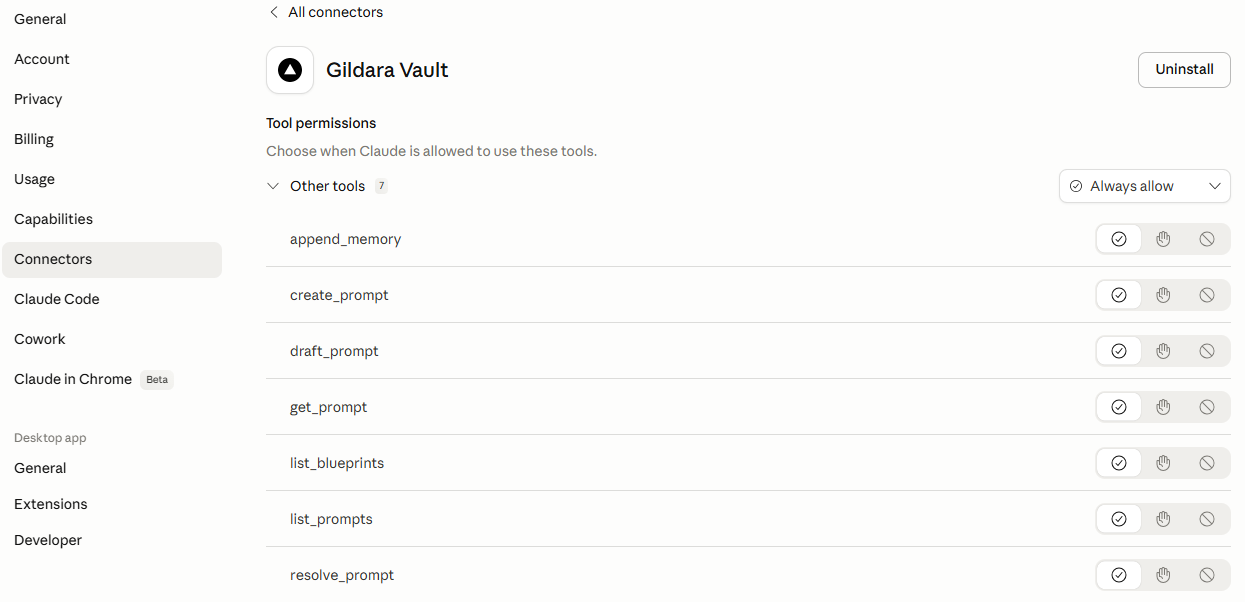
5. Add to Claude Chat (claude.ai)
Gildara supports Remote MCP via HTTP/SSE.
- Go to Settings > Connectors in Claude Chat.
- Select "Add custom connector".
- Name: Gildara Vault.
- Remote MCP server URL:
https://gildara.io/api/mcp/mcp. - Authentication: OAuth 2.1 (you will be redirected to the Gildara consent page to authorize).
Tools
| Tool | Description |
|---|---|
search_prompts | Semantic search over your vault using Gemini embeddings |
list_prompts | List all prompts in your vault |
get_prompt | Get prompt details and operating contract config |
resolve_prompt | Get compiled system prompt with variable substitution |
run_prompt | Run prompt through AI with auto-repair |
create_prompt | Create a new prompt |
append_memory | Add info to an existing memory-type prompt |
save_brief | Dispatch a brief to a named agent (MD attachment via Telegram, @mention routes to the right bot) |
list_blueprints | Browse 48+ agent blueprint templates |
Example usage
Once connected, just tell your AI:
- "Search my vault for prompts related to security audits."
- "Resolve my code-review-agent prompt with the
code_diffvariable." - "Run the security-audit prompt against this code."
- "Append this preference to my 'Personal Context' memory: I prefer TypeScript over JavaScript."
- "Send this to gevorg: analyze last week's Meta Ads performance and flag the bottom 3 campaigns."
Local-First Support
Gildara features a local-first architecture. The MCP server automatically caches resolved prompts to ~/.gildara/cache/ to ensure your agents remain functional even if the Gildara API is temporarily unreachable.
Environment variables
| Variable | Required | Description |
|---|---|---|
GILDARA_API_KEY | No | Your API key (pvk_...). If unset, the server auto-provisions a new agent account on first run and caches the key at ~/.gildara/auto-key.json. Set this explicitly to use an existing key. |
GILDARA_BASE_URL | No | Override API URL (default: https://gildara.io). |
License
MIT
Contributing / Maintainers
This package is the stdio MCP server. A sibling HTTP server lives at app/api/mcp/[transport]/route.ts in the parent monorepo (powers the Claude.ai native connector). Both must stay at parity — tool names, argument schemas, response text.
Before adding, removing, or changing a tool here, read docs/MCP_INTEGRATION_CONTRACT.md and run npm run test:unit from the monorepo root to verify parity.
Featured
Keep your Mac awake while Claude Code and 40+ AI agents run. Sleeps when they're idle.
One time payment $9 →Integrate web data into your AI product. One API to scrape website & brand data.
Get API Key Now →Agent, run crypto. Access onchain data & trade routes via 1inch.
Install now →On Capafy, your Skill runs online 24/7 as an agent product, and you get paid every time someone uses it.
Start earning →Configuration
GILDARA_API_KEYYour API key (pvk_...). If unset, auto-provisions a free agent account on first run.