
Summary
This connects Claude to the Geargrafx TurboGrafx-16 emulator's debugging infrastructure. You get programmatic access to execution control, memory inspection, hardware status monitoring, and rewind capabilities. Reach for this when you need AI-assisted debugging of PC Engine games or want to automate emulator analysis tasks. The emulator itself has full debugging support with breakpoints, disassembly, and hardware viewers for both VDCs in SuperGrafx mode, and this MCP layer exposes those internals to Claude. Useful for reverse engineering old games, tracking down bugs in homebrew, or building automated testing workflows against the emulator state.


Keep your Mac awake while Claude Code and 40+ AI agents run. Sleeps when they're idle.
One time payment $9 →

Integrate web data into your AI product. One API to scrape website & brand data.
Get API Key Now →
Agent, run crypto. Access onchain data & trade routes via 1inch.
Install now →
On Capafy, your Skill runs online 24/7 as an agent product, and you get paid every time someone uses it.
Start earning →
Geargrafx




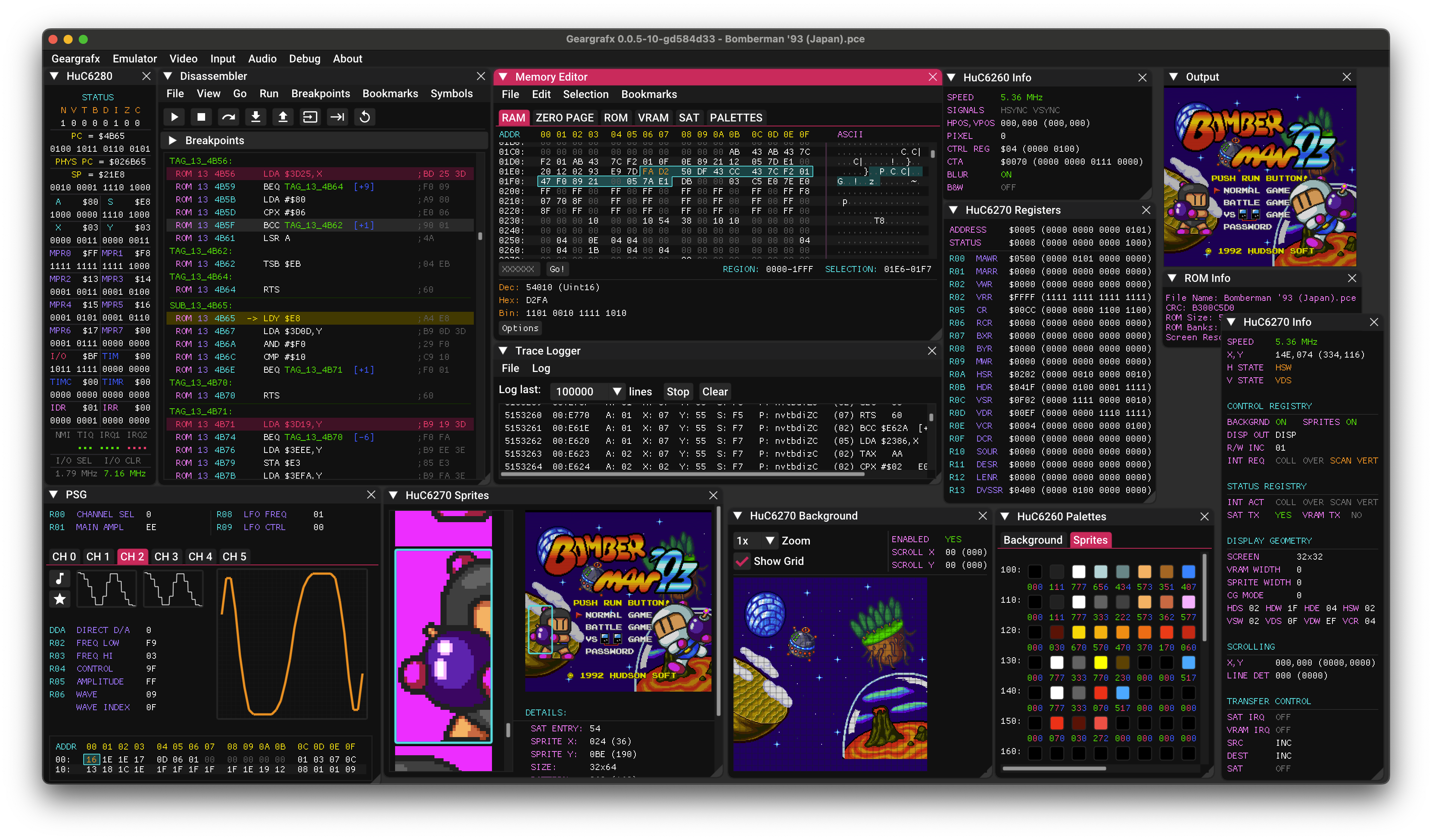
Geargrafx is a very accurate, cross-platform TurboGrafx-16 / PC Engine / SuperGrafx / PCE CD-ROM² emulator written in C++ that runs on Windows, macOS, Linux, BSD and RetroArch, with an embedded MCP server for debugging and tooling.
This is an open source project with its ongoing development made possible thanks to the support by these awesome backers. If you find it useful, please consider sponsoring.
Don't hesitate to report bugs or ask for new features by opening an issue.
Downloads
| Platform | Architecture | Download Link |
|---|---|---|
| Windows | Desktop x64 | Geargrafx-1.7.11-desktop-windows-x64.zip |
| Desktop ARM64 | Geargrafx-1.7.11-desktop-windows-arm64.zip | |
| macOS | Homebrew | brew install --cask drhelius/geardome/geargrafx |
| Desktop Apple Silicon | Geargrafx-1.7.11-desktop-macos-arm64.zip | |
| Desktop Intel | Geargrafx-1.7.11-desktop-macos-intel.zip | |
| Linux | Ubuntu PPA | drhelius/ppa-geardome |
| Fedora RPM | drhelius/rpm-geardome | |
| Desktop Ubuntu 24.04 x64 | Geargrafx-1.7.11-desktop-ubuntu24.04-x64.zip | |
| Desktop Ubuntu 22.04 x64 | Geargrafx-1.7.11-desktop-ubuntu22.04-x64.zip | |
| Desktop Ubuntu 24.04 ARM64 | Geargrafx-1.7.11-desktop-ubuntu24.04-arm64.zip | |
| MCPB | All platforms | MCP Readme |
| RetroArch | All platforms | Libretro core documentation |
| Dev Builds | All platforms | GitHub Actions |
Notes:
- Windows: May need Visual C++ Redistributable and OpenGL Compatibility Pack
- Homebrew: If Homebrew asks you to trust the third-party tap, run
brew trust --tap drhelius/geardome - Linux: May need
libsdl3
Features
- Accurate emulation supporting the entire HuCard PCE / SGX catalog.
- Support for CD-ROM², Super CD-ROM² and Arcade CD-ROM² systems.
- Save states with preview and rewind support.
- Backup RAM and Memory Base 128 support.
- Multi Tap (up to 5 players).
- Standard Gamepad (2 buttons), Avenue Pad 3 (3 buttons, auto-configured based on game), Avenue Pad 6 (6 buttons) and Mouse.
- Adjustable scanline count (224p, 240p or manual).
- RGB or Composite color output with optional LPF filter.
- Compressed ROM and CD image support (pce, sgx, cue, zip and chd).
- Support for playing physical CD-ROM discs.
- Music ROM support: HES.
- VGM recorder.
- Internal database for automatic ROM detection and hardware selection if
Autooptions are selected. - Supported platforms (standalone): Windows, Linux, BSD and macOS.
- Supported platforms (libretro): Windows, Linux, macOS, Raspberry Pi, Android, iOS, tvOS, webOS, PlayStation Vita, PlayStation 3, Nintendo 3DS, Nintendo GameCube, Nintendo Wii, Nintendo WiiU, Nintendo Switch, Emscripten, Classic Mini systems (NES, SNES, C64, ...), OpenDingux, RetroFW and QNX.
- Full debugger with just-in-time disassembler, CPU breakpoints, memory access breakpoints, code navigation (goto address, JP JR and JSR double clicking), debug symbols, automatic labels, memory editor, PSG inspector and video viewer including registers, tiles, sprites, backgrounds, CD-ROM sub-systems and both VDCs in SuperGrafx mode.
- MCP server for AI-assisted debugging with GitHub Copilot, Claude, Codex and similar, exposing tools for execution control, memory inspection, hardware status, rewind and more.
- Windows and Linux Portable Mode.
- Programmable Shader Chain.
- ROM loading from the command line by adding the ROM path as an argument.
- ROM loading using drag & drop.
- Support for modern game controllers through gamecontrollerdb.txt file located in the same directory as the application binary.
Tips
Basic Usage
- BIOS: Geargrafx requires a BIOS to run CD-ROM games. It is possible to load any BIOS but the System Card 3.0 with md5
38179df8f4ac870017db21ebcbf53114is recommended. - CD-ROM Images: Geargrafx supports
chd, zipped and unzippedcue/bin,cue/imgandcue/isoimages.cue/iso + wavis also supported when audio track format is 44100Hz, 16 bit, stereo. It does not support MP3 or OGG audio tracks. - Mouse Cursor: Automatically hides when hovering over the main output window or when Main Menu is disabled.
- Portable Mode: Create an empty file named
portable.iniin the same directory as the application binary to enable portable mode.
Debugging Features
- Docking Windows: In debug mode, you can dock windows together by pressing SHIFT and dragging a window onto another.
- Multi-viewport: In Windows or macOS, you can enable "multi-viewport" in the debug menu. You must restart the emulator for the change to take effect. Once enabled, you can drag debugger windows outside the main window.
- Single Instance: You can enable "Single Instance" in the
Emulatormenu. When enabled, opening a ROM while another instance is running will send the ROM to the running instance instead of starting a new one. - Debug Symbols: The emulator automatically tries to load a symbol file when loading a ROM (.sym, .lbl, .noi). For example, for
path_to_rom_file.romit tries to loadpath_to_rom_file.sym. You can also load symbol files using the GUI or the CLI. It supports PCEAS (old and new format), wla-dx and vasm file formats.
Command Line Usage
geargrafx [options] [game_file] [symbol_file]

Arguments:
  [game_file]              Game file: accepts ROMs (.pce, .sgx, .hes), CUE (.cue) or ZIP (.zip)
  [symbol_file]            Optional symbol file for debugging

Options:
  -f, --fullscreen         Start in fullscreen mode
  -w, --windowed           Start in windowed mode with menu visible
      --mcp-stdio          Auto-start MCP server with stdio transport
      --mcp-http           Auto-start MCP server with HTTP transport
      --mcp-no-router      Expose all MCP tools directly
      --mcp-http-address A HTTP bind address (default: 127.0.0.1)
      --mcp-http-port N    HTTP port for MCP server (default: 7777)
      --headless           Run without GUI (requires --mcp-stdio or --mcp-http)
  -v, --version            Display version information
  -h, --help               Display this help message
MCP Server
Geargrafx includes a Model Context Protocol (MCP) server that enables AI-assisted debugging through AI agents like GitHub Copilot, Claude, Codex and similar. The server provides tools for execution control, memory inspection, breakpoints, disassembly, hardware status, rewind and more. HTTP transport binds to 127.0.0.1 by default, validates Host and browser Origin values against the configured endpoint, and can require bearer-token auth with the GEARGRAFX_MCP_HTTP_TOKEN environment variable.
For complete setup instructions and tool documentation, see MCP_README.md.
Agent Skills
Geargrafx provides Agent Skills that teach AI assistants how to effectively use the emulator for specific tasks:
- geargrafx-debugging — Game debugging, code tracing, breakpoint management, hardware inspection, and reverse engineering.
- geargrafx-romhacking — Cheat creation, memory searching, ROM data modification, text translation, and game patching.
Install with npx skills add drhelius/geargrafx. See the skills README for details.
Build Instructions
Windows
- Install Microsoft Visual Studio Community 2026 or later.
- Download the latest SDL3 VC development libraries from SDL3 Releases (the file named
SDL3-devel-x.y.z-VC.zip). - Extract the archive and rename the resulting folder (e.g.
SDL3-x.y.z) toSDL3. - Place the
SDL3folder insideplatforms/windows/dependencies/so that the include path isplatforms/windows/dependencies/SDL3/include/SDL3/. - Open the Geargrafx Visual Studio solution
platforms/windows/Geargrafx.slnand build.
macOS
- Install Xcode and run
xcode-select --installin the terminal for the compiler to be available on the command line. - Run these commands to generate a Mac app bundle:
brew install sdl3
cd platforms/macos
make dist
Linux
- Ubuntu / Debian / Raspberry Pi (Raspbian):
If you are using Ubuntu 25.04 or later, you can install SDL3 directly. Use the following commands to build:
sudo apt install build-essential libsdl3-dev
cd platforms/linux
make
For older Ubuntu versions (22.04, 24.04), you need to build SDL3 from source first. Use the following commands to build both SDL3 and Geargrafx:
sudo apt install build-essential cmake git curl jq pkg-config \
  libx11-dev libxext-dev libxrandr-dev libxcursor-dev libxfixes-dev \
  libxi-dev libxss-dev libxkbcommon-dev libwayland-dev libdecor-0-dev \
  libdrm-dev libgbm-dev libgl1-mesa-dev libegl1-mesa-dev libdbus-1-dev libudev-dev libxtst-dev
SDL3_TAG=$(curl -s https://api.github.com/repos/libsdl-org/SDL/releases/latest | jq -r '.tag_name')
git clone --depth 1 --branch "$SDL3_TAG" https://github.com/libsdl-org/SDL.git /tmp/SDL3
cmake -S /tmp/SDL3 -B /tmp/SDL3/build -DCMAKE_INSTALL_PREFIX=/usr -DSDL_TESTS=OFF -DSDL_EXAMPLES=OFF
cmake --build /tmp/SDL3/build -j$(nproc)
sudo cmake --install /tmp/SDL3/build
cd platforms/linux
make
- Fedora:
sudo dnf install @development-tools gcc-c++ SDL3-devel
cd platforms/linux
make
- Arch Linux:
sudo pacman -S base-devel sdl3
cd platforms/linux
make
BSD
- FreeBSD:
su root -c "pkg install -y git gmake pkgconf sdl3"
cd platforms/bsd
USE_CLANG=1 gmake
- NetBSD:
su root -c "pkgin install gmake pkgconf SDL3"
cd platforms/bsd
gmake
- OpenBSD
doas pkg_add gmake sdl3
cd platforms/bsd
LDFLAGS=-L/usr/X11R6/lib/ USE_CLANG=1 gmake
Libretro
- Ubuntu / Debian / Raspberry Pi (Raspbian):
sudo apt install build-essential
cd platforms/libretro
make
- Fedora:
sudo dnf install @development-tools gcc-c++
cd platforms/libretro
make
Contributors
Thank you to all the people who have already contributed to Geargrafx!
License
Geargrafx is licensed under the GNU General Public License v3.0 License, see LICENSE for more information.
Featured
Keep your Mac awake while Claude Code and 40+ AI agents run. Sleeps when they're idle.
One time payment $9 →Integrate web data into your AI product. One API to scrape website & brand data.
Get API Key Now →Agent, run crypto. Access onchain data & trade routes via 1inch.
Install now →On Capafy, your Skill runs online 24/7 as an agent product, and you get paid every time someone uses it.
Start earning →Categories
Registryactive
Packagehttps://github.com/drhelius/geargrafx/releases/download/1.7.9/Geargrafx-1.7.9-mcpb-macos-arm64.mcpb
TransportSTDIO
UpdatedMay 31, 2026


