
Summary
Connects Claude to Formula 1's timing feeds and historical database going back to 1950. In lite mode you get 14 tools for race results, lap times, telemetry at 4Hz, tyre strategy, pit stops, and race control messages with no API keys required. Install the full version with FastF1 and you unlock 67 tools including visual speed trace plots, gear shift maps, brake point analysis, overtake detection, and live timing during active sessions. Ask it to compare Hamilton's throttle trace against Verstappen's quali lap or pull every safety car deployment at Silverstone since 2010. Built for anyone who wants actual telemetry data instead of LLM approximations of what happened on track.


Keep your Mac awake while Claude Code and 40+ AI agents run. Sleeps when they're idle.
One time payment $9 →

Integrate web data into your AI product. One API to scrape website & brand data.
Get API Key Now →
Agent, run crypto. Access onchain data & trade routes via 1inch.
Install now →
On Capafy, your Skill runs online 24/7 as an agent product, and you get paid every time someone uses it.
Start earning →
Pitwall
Turn Claude into your F1 race engineer.
Real telemetry. Real strategy data. Real-time during races. 75 years of history.




Quick Start
pip install f1pitwall
claude mcp add pitwall -- f1pitwall
Then ask Claude: "Who won the 2025 Australian GP?"
Want visual plots and deep analysis?
pip install "f1pitwall[full]"
Install from source instead
git clone https://github.com/darshjoshi/pitwall.git && cd pitwall
pip install "mcp[cli]" requests        # lite
pip install -r requirements-full.txt   # full
claude mcp add pitwall -- python3 $(pwd)/pitwall.py
Why Pitwall?
Claude knows F1 from training data — but it can't look up last week's race. It can't show you Verstappen's throttle trace through Turn 1. It doesn't know who pitted first or when the safety car came out.
Pitwall connects Claude to live F1 data:
- Real data, not hallucinations — actual timing feeds from formula1.com
- Lap-level telemetry — speed, RPM, throttle, brake, gear, DRS at 4Hz per car
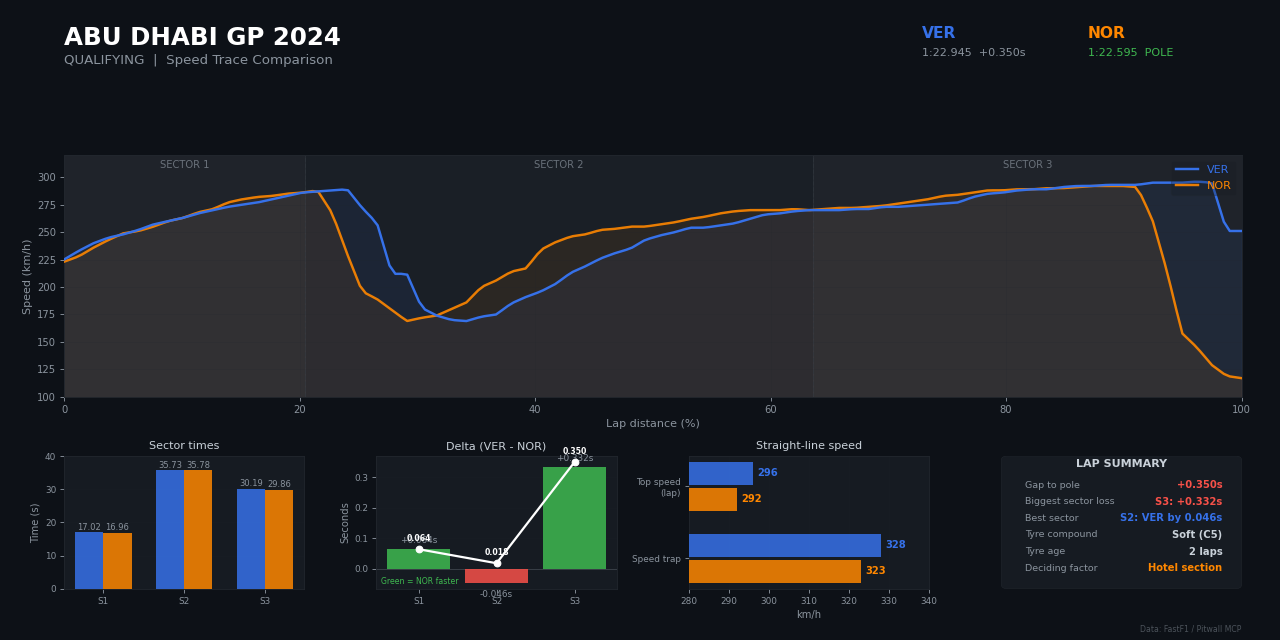
- Visual plots — speed trace comparisons, gear shift maps returned as images
- 75 years of history — every race result and championship since 1950
- Live during races — real-time positions, gaps, weather, and race control
- Zero API keys — all core data is free, no account needed
What You Can Ask
"Who won the 2025 Australian GP?"           → Race results and classification
"Verstappen's speed on lap 25 at Monaco"    → Lap telemetry at 4Hz
"Plot Hamilton vs Norris speed trace"       → Visual speed comparison chart
"Compare Ferrari's tyre strategy"           → Stint-by-stint breakdown
"Who won the 1994 championship?"            → 75 years of history
"When was the safety car at Silverstone?"   → Race control messages and flags
See all example questions
| Question | Tool Used |
|---|---|
| "Who won the Chinese GP?" | get_standings |
| "What was Verstappen's speed on lap 25?" | get_telemetry |
| "Compare Hamilton vs Leclerc" | get_driver_comparison |
| "What tyres did everyone use?" | get_tyre_strategy |
| "Fastest pit stop at Australia 2025?" | get_pit_stops |
| "When was the safety car?" | get_race_control |
| "Was it raining during the race?" | get_weather |
| "Top speeds at Monza 2024?" | get_speed_traps |
| "Norris's lap times in the race" | get_lap_times |
| "Who won the 2005 championship?" | get_championship_standings |
| "Plot Verstappen vs Hamilton speed trace" | plot_telemetry_comparison |
| "Show me the gear shift map at Monaco" | plot_gear_shifts |
| "Who gained the most positions?" | compare_grid_to_finish |
| "Overtakes in the race" | detect_overtakes |
| "Compare Verstappen lap 5 vs lap 50" | plot_multi_telemetry_comparison |
| "Ferrari head-to-head in qualifying" | team_head_to_head |
| "Deleted laps in qualifying" | get_deleted_laps |
| "Gap to leader throughout the race" | get_gap_to_leader |
Features
67 tools across two modes. Pitwall auto-detects what's installed — no config changes needed.
Lite Mode (14 tools)
pip install "mcp[cli]" requests — no heavy dependencies.
Race results, lap times, telemetry, tyre strategy, pit stops, weather, race control, speed traps, driver comparison, and historical data back to 1950. Uses F1's free static archive and the Jolpica API.
Full Mode (67 tools)
pip install -r requirements-full.txt — adds FastF1.
Everything in Lite, plus:
| Category | What You Get |
|---|---|
| Visual Plots | Speed trace comparisons, gear shift maps, multi-lap telemetry overlays |
| Deep Telemetry | Brake point analysis, RPM patterns, DRS usage, throttle traces |
| Advanced Strategy | Stint degradation, compound comparisons, tire age performance |
| Race Intelligence | Overtake detection, gap tracking, position changes, qualifying progression |
| Live Data | Real-time positions, lap times, sector times, weather during active sessions |
Full tool list (67 tools)
Lite Tools (always available)
| Tool | Description |
|---|---|
list_seasons | Available seasons (2018-present) |
list_races | Full season calendar with dates |
get_race_info | Session details and available data feeds |
get_standings | Race classification — positions, gaps, best laps, pits |
get_lap_times | Lap-by-lap times, filterable by driver and lap range |
get_telemetry | Speed, RPM, throttle, brake, gear, DRS for a specific lap |
get_tyre_strategy | Compound, stint length, new/used for every driver |
get_pit_stops | All pit stops sorted by fastest |
get_race_control | Flags, penalties, safety cars, investigations |
get_weather | Air/track temp, rain, humidity, wind |
get_speed_traps | Speed at 4 measurement points per driver |
get_driver_comparison | Head-to-head: position, pace, strategy, pit stops |
get_historical_results | Race results from 1950 to present |
get_championship_standings | Driver/constructor championships from 1950+ |
FastF1 Tools (requires FastF1)
| Category | Tools |
|---|---|
| Visual Plots | plot_telemetry_comparison, plot_gear_shifts, plot_multi_telemetry_comparison, plot_driver_telemetry_comparison |
| Telemetry Analysis | analyze_brake_points, analyze_rpm_data, analyze_drs_usage |
| Lap Analysis | get_lap_times_fastf1, get_deleted_laps, analyze_lap_consistency, get_fastest_sectors, get_personal_best_laps, compare_sector_times |
| Strategy | get_driver_tyre_detail, get_stint_analysis, compare_tire_compounds, compare_tire_age_performance, analyze_starting_tires, compare_strategies |
| Race Analysis | get_race_results, get_sprint_results, get_session_summary, get_fastest_lap_data, detect_overtakes, compare_grid_to_finish, get_qualifying_progression |
| Pit Stops | get_pit_stop_detail, get_fastest_pit_stops |
| Driver & Team | get_driver_info, get_driver_standings, get_constructor_standings, team_head_to_head, get_team_laps, analyze_long_run_pace |
| Track & Safety | get_circuit_info, get_track_status, get_track_record, get_race_control_messages, get_penalties, get_dnf_list |
| Speed & Position | get_speed_trap_comparison, get_position_changes, get_gap_to_leader |
| History | get_race_winners_history |
| Live Data | get_live_session_status, get_live_positions, get_live_lap_times, get_live_sector_times, get_live_telemetry, get_live_weather |
| Session | get_schedule, get_session_info, get_weather_data |
Setup
macOS
Claude Code:
claude mcp add pitwall -- python3 /absolute/path/to/pitwall.py
Claude Desktop — add to ~/Library/Application Support/Claude/claude_desktop_config.json:
{
  "mcpServers": {
    "pitwall": {
      "command": "python3",
      "args": ["/absolute/path/to/pitwall.py"]
    }
  }
}
Windows
1. Find your Python path:
where python
This will return something like C:\Users\YourName\AppData\Local\Programs\Python\Python313\python.exe or C:\Python313\python.exe.
2. Note where you cloned Pitwall:
For example: C:\Users\YourName\Projects\pitwall\pitwall.py
Claude Code (PowerShell):
claude mcp add pitwall -- python C:\Users\YourName\Projects\pitwall\pitwall.py
Claude Desktop — add to %APPDATA%\Claude\claude_desktop_config.json:
To open this folder, press
Win + R, type%APPDATA%\Claude, and hit Enter. If theClaudefolder orclaude_desktop_config.jsondoesn't exist, create them.
{
  "mcpServers": {
    "pitwall": {
      "command": "python",
      "args": ["C:\\Users\\YourName\\Projects\\pitwall\\pitwall.py"]
    }
  }
}
Note: Use double backslashes (
\\) in the JSON path, or forward slashes (/) — both work. The command ispython(notpython3) on Windows.
Linux
Claude Code:
claude mcp add pitwall -- python3 /absolute/path/to/pitwall.py
Claude Desktop — add to ~/.config/Claude/claude_desktop_config.json:
{
  "mcpServers": {
    "pitwall": {
      "command": "python3",
      "args": ["/absolute/path/to/pitwall.py"]
    }
  }
}
Restart Claude Code or Claude Desktop after setup. Works with any MCP-compatible client.
Optional: Beginner-Friendly Skill (Claude Desktop)
Upload SKILL.md as a skill in Claude Desktop (Settings → Skills → Upload). Claude will explain F1 jargon inline — DRS, undercut, compound, safety car, etc.
Data Sources
All core data is free and requires no API keys.
| Source | Coverage | What it provides |
|---|---|---|
| F1 Static Live Timing | 2018-present | Telemetry, timing, strategy, pit stops, weather, race control |
| Jolpica-F1 | 1950-present | Historical results and championships |
| FastF1 (optional) | 2018-present | Enhanced telemetry analysis and visual plots |
| F1 SignalR Core (optional) | Live only | Real-time race data during active sessions |
How It Works
Pitwall reads from F1's publicly available static timing archive — the same data that powers the official F1 app. After each session ends (~30 minutes), F1 publishes 33 data feeds per session including full car telemetry (speed, RPM, throttle, brake, gear, DRS at ~4Hz per car), GPS positions, tyre data, pit stops, and race control messages.
The telemetry tool (get_telemetry) correlates the timing stream with the car data stream to extract telemetry for a specific driver on a specific lap — something no other F1 MCP server does.
Architecture
Claude ──MCP──> Pitwall ──HTTP──> livetiming.formula1.com/static/ (free)
                       ──HTTP──> api.jolpi.ca/ergast/f1/ (free)
                       ──lib──>  FastF1 (optional, local)
                       ──WS───> SignalR Core (optional, live races)
Running the Server
python3 pitwall.py              # MCP stdio (Claude Code / Claude Desktop)
python3 pitwall.py --http       # MCP HTTP (remote / self-hosted)
python3 pitwall.py --http --port 3000
Live Race Data
Pitwall includes a raw SignalR Core WebSocket client for real-time data during active F1 sessions. Most data is free — car telemetry and GPS require an F1 TV Pro or Premium subscription.
What's free vs what needs F1 TV
| Data | Free | F1 TV |
|---|---|---|
| Race positions, gaps, lap times | Yes | Yes |
| Race control, flags, penalties | Yes | Yes |
| Weather, track status | Yes | Yes |
| Tyre compounds, stint info | Yes | Yes |
| Team radio URLs | Yes | Yes |
| Car telemetry (speed, RPM, throttle, brake) | No | Yes |
| GPS positions (X/Y/Z coordinates) | No | Yes |
All data (including telemetry and GPS) becomes free in the static archive ~30 minutes after a session ends.
Authentication setup
python3 auth_setup.py
This opens a browser for F1 TV login. The token is saved locally:
<project_dir>/.f1token~/Library/Application Support/fastf1/f1auth.json(macOS)
Token expires every ~4 days. Re-run to refresh. Never uploaded anywhere.
Live client usage
import asyncio
from signalr_client import F1LiveClient

async def main():
    # Free mode — timing, weather, race control (no auth needed)
    client = F1LiveClient(no_auth=True)

    @client.on("TimingData")
    def on_timing(data, timestamp):
        for num, info in data.get("Lines", {}).items():
            print(f"P{info.get('Position','?')} #{num} Gap: {info.get('GapToLeader','')}")

    @client.on("RaceControlMessages")
    def on_rc(data, timestamp):
        for msg in data.get("Messages", {}).values():
            print(f"[{msg.get('Flag', '')}] {msg.get('Message', '')}")

    await client.connect()

asyncio.run(main())
For full telemetry (speed, RPM, throttle, brake, GPS):
from auth_setup import load_token

client = F1LiveClient(no_auth=False, auth_token=load_token())

@client.on("CarData.z")
def on_telemetry(data, timestamp):
    # Speed, RPM, throttle, brake, gear, DRS at ~4Hz per car
    ...

@client.on("Position.z")
def on_position(data, timestamp):
    # GPS X/Y/Z coordinates at ~4Hz per car
    ...
Reference
Race Names
Race names are fuzzy-matched. All of these work:
"china", "chinese", "shanghai"           → Chinese Grand Prix
"australia", "melbourne", "aus"          → Australian Grand Prix
"monaco", "monte carlo"                  → Monaco Grand Prix
"silverstone", "great britain", "british" → British Grand Prix
Driver Codes
VER = Verstappen    HAM = Hamilton    NOR = Norris     LEC = Leclerc
ANT = Antonelli     RUS = Russell     PIA = Piastri    BEA = Bearman
GAS = Gasly         LAW = Lawson      HAD = Hadjar     SAI = Sainz
ALO = Alonso        STR = Stroll      OCO = Ocon       BOT = Bottas
ALB = Albon         HUL = Hulkenberg  COL = Colapinto  LIN = Lindblad
Project Files
| File | Purpose |
|---|---|
pitwall.py | MCP server — 67 tools, auto-degrades to 14 without FastF1 |
signalr_client.py | Raw SignalR Core WebSocket client for live race data |
decompressor.py | Zlib decompression for CarData.z / Position.z |
merger.py | Keyframe + delta state management for F1's incremental format |
topics.py | All 20 SignalR topics with auth/compression metadata |
auth_setup.py | F1 TV token setup — browser-based OAuth flow |
Contributing
Found a bug? Want to add a tool? Contributions are welcome.
- Fork the repo
- Create a feature branch
- Make your changes
- Run the test suite:
python3 tests/pitwall_tool_validation.py - Open a pull request
Credits
- FastF1 by @theOehrly — the gold standard F1 Python library
- Jolpica-F1 — the Ergast API successor
- drivenrajat/f1 — inspiration for FastF1 tool patterns
Built by
Darsh Joshi — AI Engineer



License
MIT
Featured
Keep your Mac awake while Claude Code and 40+ AI agents run. Sleeps when they're idle.
One time payment $9 →Integrate web data into your AI product. One API to scrape website & brand data.
Get API Key Now →Agent, run crypto. Access onchain data & trade routes via 1inch.
Install now →On Capafy, your Skill runs online 24/7 as an agent product, and you get paid every time someone uses it.
Start earning →