
Summary
Gives Claude direct access to Unity's API documentation for 2022 LTS, 2023, and Unity 6 through a local SQLite database. You can search by keyword, pull exact method signatures with all overloads, resolve namespaces, check deprecation status, or get full class references. It covers all UnityEngine and UnityEditor modules plus common packages like Input System and Addressables. The server downloads version-specific databases on first run and queries return in under 15ms. Useful when you're tired of Claude hallucinating method signatures or suggesting deprecated APIs. Set UNITY_VERSION in your config or point it at a project path to auto-detect from ProjectVersion.txt.


Keep your Mac awake while Claude Code and 40+ AI agents run. Sleeps when they're idle.
One time payment $9 →

Integrate web data into your AI product. One API to scrape website & brand data.
Get API Key Now →
Agent, run crypto. Access onchain data & trade routes via 1inch.
Install now →
On Capafy, your Skill runs online 24/7 as an agent product, and you get paid every time someone uses it.
Start earning →
unity-api-mcp







MCP server that gives AI agents accurate Unity API documentation. Prevents hallucinated signatures, wrong namespaces, and deprecated API usage.
Supports Unity 2022 LTS, 2023, and Unity 6 with separate databases for each version. Works with Claude Code, Cursor, Windsurf, or any MCP-compatible AI tool. No Unity installation required.
Quick Start
Add to your MCP config (.mcp.json, mcp.json, or your tool's MCP settings), setting UNITY_VERSION to match your project:
{
  "mcpServers": {
    "unity-api": {
      "command": "uvx",
      "args": ["unity-api-mcp"],
      "env": {
        "UNITY_VERSION": "2022"
      }
    }
  }
}
Valid values: "2022", "2023", or "6".
On first run the server downloads the correct database (~18-24 MB) to ~/.unity-api-mcp/.
How It Works
- Version detection. The server figures out which Unity version to serve:
| Priority | Source | Example |
|---|---|---|
| 1 | UNITY_VERSION env var | "2022", "6", or "6000.3.8f1" |
| 2 | UNITY_PROJECT_PATH | Reads ProjectSettings/ProjectVersion.txt, maps 2022.3.62f1 to "2022" |
| 3 | Default | "6" |
-
Database download. If the database for that version isn't cached locally, it downloads from GitHub (one time).
-
Serve. All tool calls query the version-specific SQLite database. Every query returns in <15ms.
Each version has its own database with the correct signatures, deprecation warnings, and member lists for that release.
Tools
| Tool | Purpose | Example |
|---|---|---|
search_unity_api | Find APIs by keyword | "Tilemap SetTile", "async load scene" |
get_method_signature | Exact signatures with all overloads | UnityEngine.Physics.Raycast |
get_namespace | Resolve using directives | "SceneManager" -> using UnityEngine.SceneManagement; |
get_class_reference | Full class reference card | "InputAction" -> all methods/fields/properties |
get_deprecation_warnings | Check if an API is obsolete | "WWW" -> Use UnityWebRequest instead |
Coverage
All UnityEngine and UnityEditor modules, plus packages parsed from C# source: Input System, Addressables, uGUI, TextMeshPro, AI Navigation, and Netcode.
| Version | Records | Deprecated | Modules | Size |
|---|---|---|---|---|
| Unity 2022 LTS | 32,000 | 442 | 86 XML + packages | 18 MB |
| Unity 2023 | 31,387 | 436 | 92 XML | 18 MB |
| Unity 6 | 42,223 | 516 | 139 XML + packages | 24 MB |
Does not cover third-party assets (DOTween, VContainer, Newtonsoft.Json). For those, rely on project source.
Benchmarks
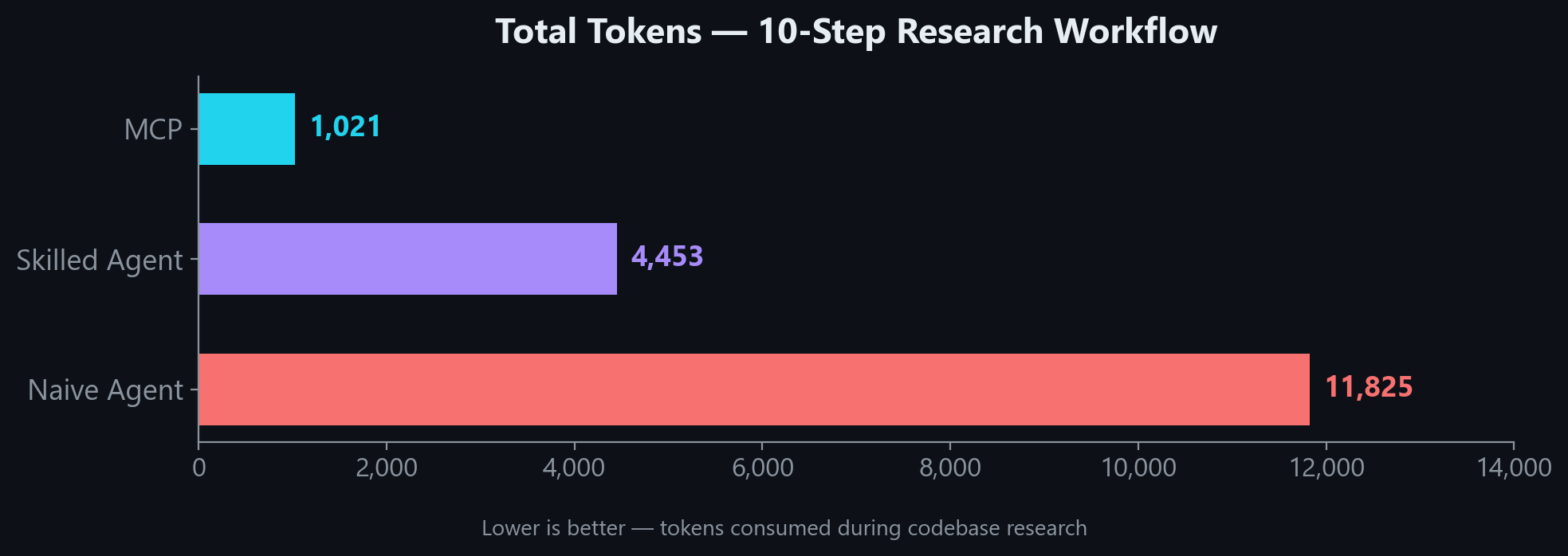
In a 10-step research workflow, MCP uses 4x fewer tokens than a skilled agent and 11x fewer than a naive agent:
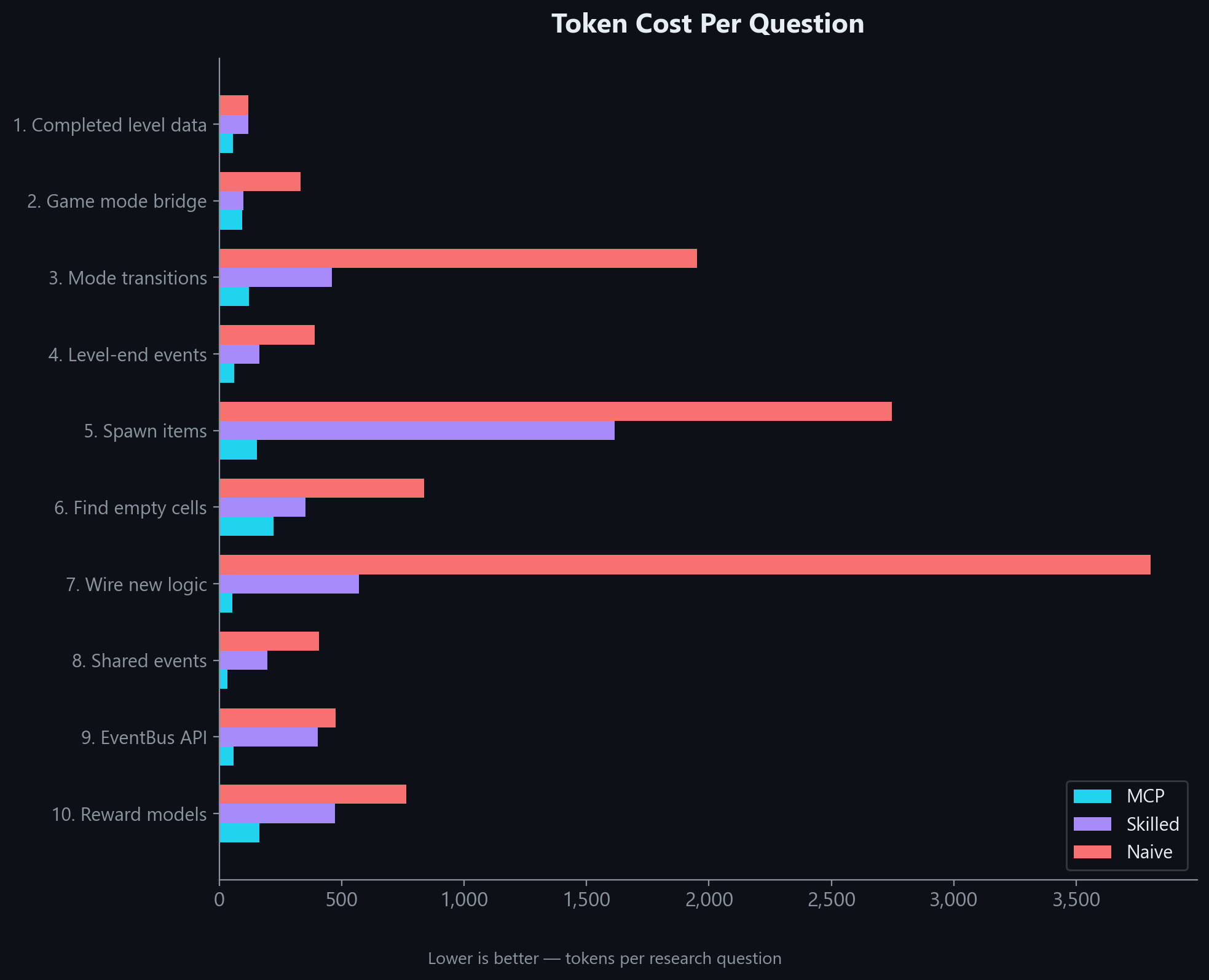
The gap holds across every question type. MCP wins on simple lookups and complex multi-part research alike:
Even in a realistic hybrid workflow where MCP results are followed up with targeted file reads, it still uses 54% fewer tokens than a skilled agent working without MCP:
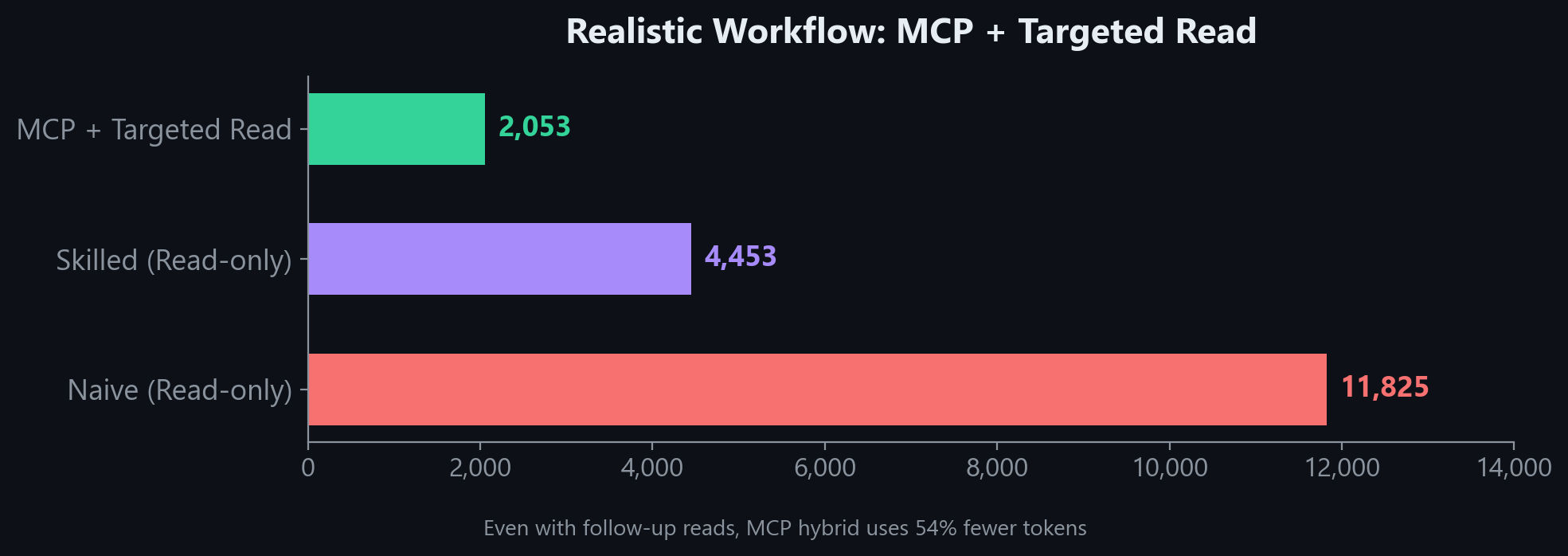
"Without MCP" estimates assume full file reads. A skilled agent with good tooling may use fewer tokens than shown. What MCP guarantees is a correct, structured answer in 1 call every time.
Per-question breakdown
Accuracy
| Test | Result |
|---|---|
| Search top-1 relevance (12 common queries) | 100% |
| Namespace resolution (6 key classes) | 100% |
| Key class coverage (17 common Unity classes) | 94% (16/17) |
Ranking uses BM25 with tuned column weights (member name 10x, class name 5x) plus core namespace boosting to ensure Object.Instantiate ranks above niche APIs like InstantiationParameters.Instantiate.
CLAUDE.md Snippet
Add this to your project's CLAUDE.md (or equivalent instructions file). This step is important. Without it, the AI has the tools but won't know when to reach for them.
## Unity API Lookup (unity-api MCP)

Use the `unity-api` MCP tools to verify Unity API usage instead of guessing. **Do not hallucinate signatures.**

| When | Tool | Example |
|------|------|---------|
| Unsure about a method's parameters or return type | `get_method_signature` | `get_method_signature("UnityEngine.Tilemaps.Tilemap.SetTile")` |
| Need the `using` directive for a type | `get_namespace` | `get_namespace("SceneManager")` |
| Want to see all members on a class | `get_class_reference` | `get_class_reference("InputAction")` |
| Searching for an API by keyword | `search_unity_api` | `search_unity_api("async load scene")` |
| Checking if an API is deprecated | `get_deprecation_warnings` | `get_deprecation_warnings("FindObjectOfType")` |

**Rules:**
- Before writing a Unity API call you haven't used in this conversation, verify the signature with `get_method_signature`
- Before adding a `using` directive, verify with `get_namespace` if unsure
- Covers: all UnityEngine/UnityEditor modules, Input System, Addressables
- Does NOT cover: DOTween, VContainer, Newtonsoft.Json (third-party)
Setup Details
Auto-detect version from project path
Instead of setting UNITY_VERSION, you can point to your Unity project. The server reads ProjectSettings/ProjectVersion.txt automatically:
{
  "mcpServers": {
    "unity-api": {
      "command": "uvx",
      "args": ["unity-api-mcp"],
      "env": {
        "UNITY_PROJECT_PATH": "/path/to/your/unity-project"
      }
    }
  }
}
Alternative installation methods
Using pip install:
pip install unity-api-mcp
{
  "mcpServers": {
    "unity-api": {
      "command": "unity-api-mcp",
      "args": [],
      "env": {
        "UNITY_VERSION": "2022"
      }
    }
  }
}
Environment variables
| Variable | Purpose | Example |
|---|---|---|
UNITY_VERSION | Unity version to serve | 2022, 2023, 6, or 6000.3.8f1 |
UNITY_PROJECT_PATH | Auto-detect version from project | F:/Unity Projects/my-project |
UNITY_INSTALL_PATH | Override Unity install path (for ingest only) | D:/Unity/6000.3.8f1 |
Building databases locally
If you want to build a database from your own Unity installation instead of downloading:
# Install with ingest dependencies
pip install unity-api-mcp[ingest]

# Build for a specific version
python -m unity_api_mcp.ingest --unity-version 6 --unity-install "D:/Unity/6000.3.8f1" --project "F:/Unity Projects/MyProject"
python -m unity_api_mcp.ingest --unity-version 2022 --unity-install "D:/Unity/2022.3.62f1"
python -m unity_api_mcp.ingest --unity-version 2023 --unity-install "D:/Unity/2023.1.22f1"
Databases are written to ~/.unity-api-mcp/unity_docs_{version}.db by default.
AI-Assisted Setup
If an AI agent is setting this up for you:
Add
unity-api-mcpto my MCP config usinguvxwithUNITY_VERSIONset to match my project, append the CLAUDE.md snippet from the README, and verify withget_namespace("SceneManager").
Project structure
unity-api-mcp/
├── src/unity_api_mcp/
│   ├── server.py          # MCP server (5 tools)
│   ├── db.py              # SQLite + FTS5 database layer
│   ├── version.py         # Version detection + DB download
│   ├── xml_parser.py      # Parse Unity XML IntelliSense files
│   ├── cs_doc_parser.py   # Parse C# doc comments from package source
│   ├── unity_paths.py     # Locate Unity install + package dirs
│   └── ingest.py          # CLI ingestion pipeline
└── pyproject.toml
Databases are stored in ~/.unity-api-mcp/ (downloaded on first run).
Troubleshooting
| Problem | Fix |
|---|---|
| "Could not download Unity X database" | Check internet connection. Or build locally: python -m unity_api_mcp.ingest --unity-version 2022 |
| Wrong API version being served | Set UNITY_VERSION explicitly. Check stderr: unity-api-mcp: serving Unity <version> API docs |
| Server won't start | Check python --version (needs 3.10+). Check path: which unity-api-mcp or where unity-api-mcp |
| Third-party packages return no results | DOTween, VContainer, Newtonsoft.Json are not indexed (third-party, not Unity packages) |
See Also
unreal-api-mcp — Same concept for Unreal Engine (C++). Covers UE 5.5, 5.6, and 5.7.
Contact
Need a custom MCP server for your engine or framework? I build MCP tools that cut token waste and prevent hallucinations for AI-assisted game development. If you want something similar for your team's stack, reach out.
License
Free to use, fork, modify, and share for any personal or non-commercial purpose. Commercial use requires permission.
Featured
Keep your Mac awake while Claude Code and 40+ AI agents run. Sleeps when they're idle.
One time payment $9 →Integrate web data into your AI product. One API to scrape website & brand data.
Get API Key Now →Agent, run crypto. Access onchain data & trade routes via 1inch.
Install now →On Capafy, your Skill runs online 24/7 as an agent product, and you get paid every time someone uses it.
Start earning →Configuration
UNITY_VERSIONUnity version to serve: 2022, 2023, or 6 (default: auto-detect or 6)
UNITY_PROJECT_PATHPath to Unity project for auto-detecting version from ProjectSettings/ProjectVersion.txt
Categories
Registryactive
Packageunity-api-mcp
TransportSTDIO
UpdatedFeb 26, 2026


